We’re Still Here to Help (Even Over the Holidays!) - find out more here.
Forum Discussion

Ivan_Gusev
9 years agoExplorer | Level 3
.Net v2 SDK DropboxOAuth2Helper.ProcessCodeFlowAsync
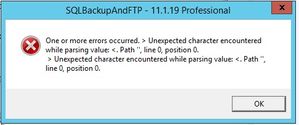
Hello! We use the Official Dropbox .Net v2 SDK Some of my clients are getting this message if they try to enter confirm oauth code. We have checked t...

Greg-DB Dropbox Community Moderator
9 years agoDropbox Community ModeratorIt looks like you should be able to configure network tracing as shown here for additional output:
https://docs.microsoft.com/en-us/dotnet/framework/network-programming/how-to-configure-network-tracing
Is there any particular input (for the 'code' parameter) that is causing this though? We can try to reproduce this here if we know the steps to do so. Thanks in advance!
https://docs.microsoft.com/en-us/dotnet/framework/network-programming/how-to-configure-network-tracing
Is there any particular input (for the 'code' parameter) that is causing this though? We can try to reproduce this here if we know the steps to do so. Thanks in advance!
 Ivan_Gusev9 years agoExplorer | Level 3
Hello Greg,
We can not reproduce the issue like our client gets, also we do not know what "code" he had.
You can get a similar, but not quite the same, error message if you enter "aaaaaaaaaaaaaaaaaaaaaaaaaaaaaa" instead of the authorization code.
In the network.log, I can see the following message "Internal Server Error".
But the client seems to get another response, in which he has the first character "<".
We will ask the client to enable network.log
- Greg-DB9 years agoThanks! The "Internal Server Error" for a malformed code like that is a known issue.
Please do let us know if you get the log for the "<" issue though. That may be a different issue, so we'll need to figure out how to reproduce it. I suspect there's some unexpected value being sent that is causing the call to fail like that. Thanks!
About Dropbox API Support & Feedback

Find help with the Dropbox API from other developers.
The Dropbox Community team is active from Monday to Friday. We try to respond to you as soon as we can, usually within 2 hours.
If you need more help you can view your support options (expected response time for an email or ticket is 24 hours), or contact us on X, Facebook or Instagram.
For more info on available support options for your Dropbox plan, see this article.
If you found the answer to your question in this Community thread, please 'like' the post to say thanks and to let us know it was useful!


