2025 sparked some incredible conversations across our community 👩💻. Discover the highlights and see what’s ahead in 2026.
Forum Discussion

Jistix_
3 years agoHelpful | Level 6
Getting `team_data.member` scope is required, but that scope is checked in the App Console
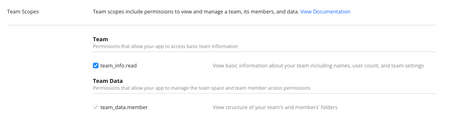
I am implementing OAuth, and when I call the OAuth URL at Dropbox, I see this error in the browser: `team_data.member` scope is required.
But that scope is checked in the App Console, for this...

Jistix_
3 years agoHelpful | Level 6
Greg-DB Is there any workaround we can use in the mean time? We're frozen on development against the Dropbox API until this is resolved.

Greg-DB Dropbox Community Moderator
3 years agoDropbox Community ModeratorJistix_ You can work around this by disabling the 'files.permanent_delete' scope for your app on the App Console. (Of course, that's only suitable if you don't need that scope.)
- Greg-DB3 years ago
Thanks for reporting this issue. This issue has now been addressed.
To resolve this issue, please now disable and then re-enable the
files.permanent_deletescope and then click "Submit" for any affected apps(s) on the "Permissions" tab for the app on the App Console. If you do not need thefiles.permanent_deletescope, you should leave it disabled.Apologies for any inconvenience this may have caused, and thanks again for bringing this to our attention.
About Dropbox API Support & Feedback

Find help with the Dropbox API from other developers.
The Dropbox Community team is active from Monday to Friday. We try to respond to you as soon as we can, usually within 2 hours.
If you need more help you can view your support options (expected response time for an email or ticket is 24 hours), or contact us on X, Facebook or Instagram.
For more info on available support options for your Dropbox plan, see this article.
If you found the answer to your question in this Community thread, please 'like' the post to say thanks and to let us know it was useful!


