Our Community is in read-only mode until April 8th, learn more here. You can still search existing threads or get help via Dropbox Support, the Dropbox Help Center, or Learn.
Forum Discussion

AdnanL
4 years agoHelpful | Level 5
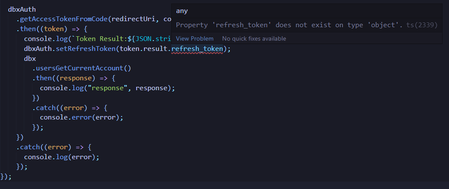
How can I solve this error: Property 'refresh_token' does not exist on type 'object'?
Hello, I am trying to make a replica in Typescript of the Dropbox webhook (that converts md files to html) that was built in Python. I copy-pasted the authentication flow from this example and I had...
- 4 years ago
AdnanL Thanks. That output looks correct and should allow the code to get the "token.result.refresh_token" value. When you say you "did not run the script before I posted this issue", do you mean that when you originally posted this and said you "reached this error that I couldn't solve", that was only a warning you saw in your IDE, and not an error occurring during execution? It sounds like this was just a TypeScript type warning, and not something preventing this code from running properly. Is that correct?
By the way, for future reference, do not post your full access or refresh token values like this. I've redacted them from your screenshot now.

Greg-DB Dropbox Community Moderator
4 years agoDropbox Community ModeratorAdnanL Thanks for following up. Can you indicate what you're getting in the console though? Specifically, the "Token Result" value being logged on line 53 from the code you shared. Please don't show actual full access/refresh token values however.

AdnanL
4 years agoHelpful | Level 5
- Greg-DB4 years ago
AdnanL Thanks. That output looks correct and should allow the code to get the "token.result.refresh_token" value. When you say you "did not run the script before I posted this issue", do you mean that when you originally posted this and said you "reached this error that I couldn't solve", that was only a warning you saw in your IDE, and not an error occurring during execution? It sounds like this was just a TypeScript type warning, and not something preventing this code from running properly. Is that correct?
By the way, for future reference, do not post your full access or refresh token values like this. I've redacted them from your screenshot now.
- AdnanL4 years agoHelpful | Level 5
Yes Greg-DB, it was just a TS warning. Here is my progress so far: https://www.toptal.com/developers/hastebin/rijajosiwa.coffeescript, everything works in this /auth route script. But I still have some problems:
First, when I click on Allow the auth route runs and I get the expected console logs but it stays in a reload status and doesn't redirect me to any page afterward.
and second, when I go to the connected apps I can find my app as shown here but not in the https://www.dropbox.com/developers/apps page.
Third thing, the app doesn't create any new folder in the Apps folder, or should I do that manually?
I hope you won't mind the long message and thank you very much for your valuable help.
- Здравко4 years agoLegendary | Level 20
AdnanL wrote:..., when I click on Allow the auth route runs and I get the expected console logs but it stays in a reload status and doesn't redirect me to any page afterward.
...
Hi AdnanL,
As far as you haven't filled the response with something to show and haven't redirected to such a page, such a behavior is normal. Either render as HTML whatever you want to show or redirect accordingly.
AdnanL wrote:..., when I go to the connected apps I can find my app as shown here but not in the https://www.dropbox.com/developers/apps page.
...
Developers page shows only applications particular user develops, nothing else. Is it the same user context developing the application or... just a test user?! 🙂 Connected application page shows all application particular user links the account to. Info can coincide, when developer only link own application(s), but it's a different meanings. That's it.
AdnanL wrote:...
Third thing, the app doesn't create any new folder in the Apps folder, or should I do that manually?
...
Seems you application has full access to the client account content and no limitation to just an application folder. In such cases, such a folder isn't need and that's why no automatically created. You have access to all folders anyway. In case of restricted application such a folder is mandatory, cosa this folder is the application's root folder, the account root is inaccessible to the application.
Hope this clarifies matter.

About Dropbox API Support and Feedback

Get help with the Dropbox API from fellow developers and experts.
The Dropbox Community team is active from Monday to Friday. We try to respond to you as soon as we can, usually within 2 hours.
If you need more help you can view your support options (expected response time for an email or ticket is 24 hours), or contact us on X, Facebook or Instagram.
For more info on available support options for your Dropbox plan, see this article.
If you found the answer to your question in this Community thread, please 'like' the post to say thanks and to let us know it was useful!


