We're making some changes to the Dropbox Community 👩💻 - Find out more here.
Forum Discussion

leqtruong
4 years agoNew member | Level 2
How to show option "access token expiration" in settings tab
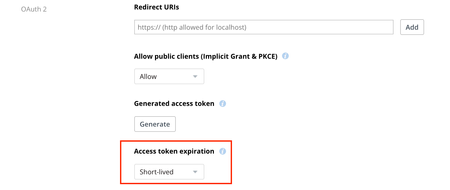
I use the same account to create 2 apps but why only 1 app has the option 'access token expiration' ? How to make every app have an 'access token expiration' option?
Thank you.

leqtruong1
4 years agoExplorer | Level 4
@Greg-DB
Thanks a lot.
But now our App has been released with customers using it and currently I can't change the code.
How can I enable "access token expiration" or on your back-end can it be set to "No expration"? Of course the dropbox package we are using is paid.

Greg-DB Dropbox Community Moderator
4 years agoDropbox Community ModeratorYou can find more information on handling this migration in the blog post. (Please also make sure that the email address on the Dropbox account that owns your API app is valid and can receive email, as that's where we send advanced notice of changes like this.)
In short though, if your app only requires short-term access and handles 401 errors already, no change is necessary. If your app doesn't handle 401 errors already, or requires long-term access (without user interaction), you would need to ship an update with support for refresh tokens implemented.
If you need more time to complete your migration, feel free to open an API ticket here from the account that owns the API app in question and we may be able to help.
About Dropbox API Support and Feedback

Get help with the Dropbox API from fellow developers and experts.
The Dropbox Community team is active from Monday to Friday. We try to respond to you as soon as we can, usually within 2 hours.
If you need more help you can view your support options (expected response time for an email or ticket is 24 hours), or contact us on X, Facebook or Instagram.
For more info on available support options for your Dropbox plan, see this article.
If you found the answer to your question in this Community thread, please 'like' the post to say thanks and to let us know it was useful!


