Need to see if your shared folder is taking up space on your dropbox 👨💻? Find out how to check here.
Forum Discussion

probi86
9 years agoExplorer | Level 3
iOS11 document picker and files app - apkg files are greyed out
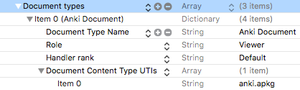
Hello, We are writing an app that handles apkg files. The app's info.plist contains the correct document types and imported Type UTIs, and everything was working well until iOS11. On iOS11 h...

Ashasverus Dropbox Staff
9 years agoDropbox StaffHi Robert
This is something that we believe has been fixed in the latest version of the app in the App store (currently 70.2). Could you check with that or let us know which version of the app you tested against. Also, thanks for providing us with the example file, can you tell me which configuration you're using in UIDocumentPickerViewController? That is, the UTIs and the mode?
-----------------------------
iOS Developer @Dropbox
 probi869 years agoExplorer | Level 3
Thanks for the reply. I have 70.2 installed, but the files are still greyed out. I am using "anki.apkg" UTI and UIDocumentPickerMode.import.
- Ashasverus9 years ago
Hi Robert
In our internal testing we opened the UIDocumentPickerController with just `public.item` UTI. It seems then that we are failing at providing the correct UTI for that item. It is the case that UTIs that are unknown get vended as dynamic UTIs. And in fact we added some fallbacks to at least vend them with `public.item` as well. But it seems this is not what you want in this case, since you want only your UTI. We would need to investigate why our app can't get your new UTI directly.
-----------------------------
iOS Developer @Dropbox
- probi869 years agoExplorer | Level 3Yes, we would like to import only files with this UTI. On iOS10 this was working fine, and currently it works correctly if I choose iCloud Drive in the document picker.
About Dropbox API Support & Feedback

Find help with the Dropbox API from other developers.
The Dropbox Community team is active from Monday to Friday. We try to respond to you as soon as we can, usually within 2 hours.
If you need more help you can view your support options (expected response time for an email or ticket is 24 hours), or contact us on X, Facebook or Instagram.
For more info on available support options for your Dropbox plan, see this article.
If you found the answer to your question in this Community thread, please 'like' the post to say thanks and to let us know it was useful!


