Our Community is in read-only mode until April 8th, learn more here. You can still search existing threads or get help via Dropbox Support, the Dropbox Help Center, or Learn.
Forum Discussion

FrustratedUser3
3 years agoCollaborator | Level 8
Mismatched redirect URI
I am using the following link to generate an authorization code for the code flow process:
https://www.dropbox.com/oauth2/authorize?client_id=CLIENT_ID&response_type=code&token_access_type=off...
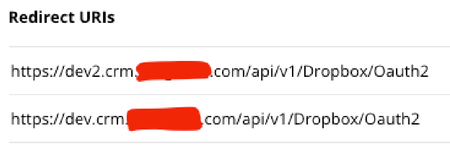
- 3 years ago
FrustratedUser3, When you use redirect URI to receive a code, you have to use the same URI as a parameter in the call to /oauth2/token (the 'redirect_uri' parameter). 🙂 In spite this parameter is optional in general, it becomes mandatory with code received through redirect URI and the value should match this URI. As can be seen, it's skipped in your code. 😉 That's where your issue comes from. Here "mismatch" probably means empty/missing doesn't match to the actual.
Good luck.

Здравко
3 years agoLegendary | Level 20
FrustratedUser3, When you use redirect URI to receive a code, you have to use the same URI as a parameter in the call to /oauth2/token (the 'redirect_uri' parameter). 🙂 In spite this parameter is optional in general, it becomes mandatory with code received through redirect URI and the value should match this URI. As can be seen, it's skipped in your code. 😉 That's where your issue comes from. Here "mismatch" probably means empty/missing doesn't match to the actual.
Good luck.
- FrustratedUser33 years agoCollaborator | Level 8
The oauth2 guide does not make that clear, but you're right. I added redirect_uri to the parameters as follows:
if(isset($code)) {
  $data[] = "grant_type=authorization_code";
  $data[] = "code={$code}";
  $data[] = "redirect_uri={$this->cfg->get("siteUrl")}/api/v1/Dropbox/Oauth2";
} else {
  $data[] = "grant_type=refresh_token";
  $data[] = "refresh_token={$this->cfg->get("dropboxRefreshToken")}";
}
It works. Thanks.
For anyone else who gets stuck on this, here is the relevant documentation:
About Dropbox API Support and Feedback

Get help with the Dropbox API from fellow developers and experts.
The Dropbox Community team is active from Monday to Friday. We try to respond to you as soon as we can, usually within 2 hours.
If you need more help you can view your support options (expected response time for an email or ticket is 24 hours), or contact us on X, Facebook or Instagram.
For more info on available support options for your Dropbox plan, see this article.
If you found the answer to your question in this Community thread, please 'like' the post to say thanks and to let us know it was useful!


