We're making some changes to the Dropbox Community 👩💻 - Find out more here.
Forum Discussion

kmsbs
7 years agoExplorer | Level 4
path not found error
At time of downloading of file from dropbox i got error :
com.dropbox.core.v2.files.DownloadErrorException: Exception in 2/files/download: {".tag":"path","path":"not_found"}
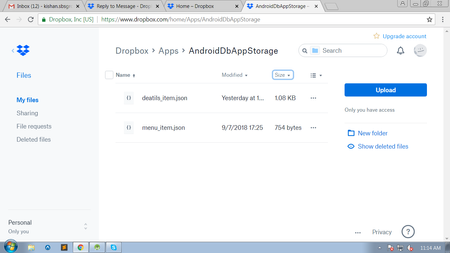
- 7 years agoWhen you say you're using the "correct" path, are you accounting for the typo? (The typo is the misplaced 'a' in "deatils".)
To be clear, based on the screenshot you supplied, the path you would need to use would be:
- if you're using a full Dropbox app: "/Apps/AndroidDbAppStorage/deatils_item.json"
- if you're using the app with the app folder permission for that "AndroidDbAppStorage" app folder: "/deatils_item.json"
Additionally, make sure you're using an access token for the right account.

kmsbs
7 years agoExplorer | Level 4
Here i only indicate that i want to download this file but in code i entered correct path and name with .json

Greg-DB Dropbox Community Moderator
7 years agoDropbox Community ModeratorWhen you say you're using the "correct" path, are you accounting for the typo? (The typo is the misplaced 'a' in "deatils".)
To be clear, based on the screenshot you supplied, the path you would need to use would be:
- if you're using a full Dropbox app: "/Apps/AndroidDbAppStorage/deatils_item.json"
- if you're using the app with the app folder permission for that "AndroidDbAppStorage" app folder: "/deatils_item.json"
Additionally, make sure you're using an access token for the right account.
To be clear, based on the screenshot you supplied, the path you would need to use would be:
- if you're using a full Dropbox app: "/Apps/AndroidDbAppStorage/deatils_item.json"
- if you're using the app with the app folder permission for that "AndroidDbAppStorage" app folder: "/deatils_item.json"
Additionally, make sure you're using an access token for the right account.
- kmsbs7 years agoExplorer | Level 4Using upload code i uploaded deatils_item.json file in AndroidDbAppStorage folder.
That mean i have access- Greg-DB7 years ago
If you uploaded the file using the same access token, that does mean you're using the right account to download from. (It doesn't indicate what permission level your app has though.)
Please make sure you're using the correct path value per my last reply.
- kmsbs7 years agoExplorer | Level 4path i using to download file:
/Apps/AndroidDbAppStorage/deatils_item.json
- kmsbs7 years agoExplorer | Level 4Thanks,I have a only AndroidDbAppStorage folder permission.
it really help.
About Dropbox API Support and Feedback

Get help with the Dropbox API from fellow developers and experts.
The Dropbox Community team is active from Monday to Friday. We try to respond to you as soon as we can, usually within 2 hours.
If you need more help you can view your support options (expected response time for an email or ticket is 24 hours), or contact us on X, Facebook or Instagram.
For more info on available support options for your Dropbox plan, see this article.
If you found the answer to your question in this Community thread, please 'like' the post to say thanks and to let us know it was useful!


