We're making some changes to the Dropbox Community 👩💻 - Find out more here.
Forum Discussion

ctubbs Dropbox Staff
5 years agoDropbox StaffPython TypeError using Dropbox API move_v2function
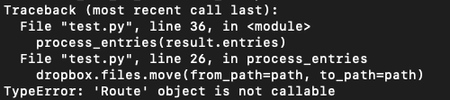
Hi, I am trying to use the API to batch rename file. I had specific questions are around the move_v2 function:
I’m running dropbox.files.move_v2(params), where the args are from_path and to_pa...

Greg-DB Dropbox Community Moderator
5 years agoDropbox Community ModeratorYour image unfortunately is not loading. Can you try sharing that again?

ctubbsDropbox Staff
5 years agoDropbox Staff
Hi Greg, can you see this?
- Greg-DB5 years ago
Yes, thanks, that's visible now.
It looks like you're trying to call the Route object itself, but those aren't the methods for making API calls. To move or rename a file, you should use dropbox.Dropbox.files_move.
You can find some basic examples of making Dropbox API calls using the Dropbox Python SDK in this example, such as creating the client here, and making a call to start listing a folder here.
To use dropbox.Dropbox.files_move in particular, it would look like:
import dropbox dbx = dropbox.Dropbox("ACCESS_TOKEN_HERE") original_path = "/test.txt" new_path = "/renamed test.txt" result = dbx.files_move(from_path=original_path, to_path=new_path) print(result)- LRomano5 years agoExplorer | Level 3
Hey Greg,
I tried to mod your code with some other snippets I've got so that I can rename all files within a root_file_path
file_path = '/root_path_here'

dbx.users_get_current_account()

result = dbx.files_list_folder(file_path, recursive=True)
file_list = []

def process_entries(entries):
    for entry in entries:
        if isinstance(entry, dropbox.files.FileMetadata):
            original = '/'+entry.name
            modified = '/test_'+entry.name
            result = dbx.files_move(from_path=original, to_path=modified)
            print(result)

process_entries(result.entries)


while result.has_more:
    result = dbx.files_list_folder_continue(result.cursor)

    process_entries(result.entries)
But am still ending up with errors. :(
Also, why do we assign the method to var: result and print?
Thanks
Luciano
- Greg-DB5 years ago
LRomano What errors are you getting now?
Looking at your code, I expect the issue is that you're not specifying the correct file path for the file to move. The Metadata.name that you're using is just the name of the file, not the full path. To get the full path, including any parent path components, you would need to use Metadata.path_lower instead.
Also, I saved the result to a variable and printed it in my sample code just for demonstration purposes. You can do whatever you need in your actual code.
About Dropbox API Support and Feedback

Get help with the Dropbox API from fellow developers and experts.
The Dropbox Community team is active from Monday to Friday. We try to respond to you as soon as we can, usually within 2 hours.
If you need more help you can view your support options (expected response time for an email or ticket is 24 hours), or contact us on X, Facebook or Instagram.
For more info on available support options for your Dropbox plan, see this article.
If you found the answer to your question in this Community thread, please 'like' the post to say thanks and to let us know it was useful!


