We're making some changes to the Dropbox Community 👩💻 - Find out more here.
Forum Discussion

ctubbs Dropbox Staff
5 years agoDropbox StaffPython TypeError using Dropbox API move_v2function
Hi, I am trying to use the API to batch rename file. I had specific questions are around the move_v2 function:
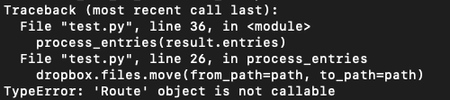
I’m running dropbox.files.move_v2(params), where the args are from_path and to_pa...

Greg-DB Dropbox Community Moderator
5 years agoDropbox Community ModeratorLRomano Thanks for sharing the error. That 'from_lookup/not_found' error does indicate that the issue is that the 'from_path' value doesn't point to anything. That does seem to be because you specified just the name and not the path, as discussed.
The Metadata.path_lower value is just a string containing the path for the item, which might look something like: "/folder/another folder/file.ext".
Since that's just a string, you can operate on it however you need. For instance, you could split it on "/" and take the parts you want, modify them, and build a new path string. Or, you could use a library or module like pathlib to work with it.

LRomano
5 years agoExplorer | Level 3
Fantastic. I used rsplit with '/' and to pull the lower_path apart giving me the file's directory and the file name.
Then I was able to add some text to the beginning of the file name, concat the whole thing together to create a new_path and it works perfectly!
Thanks so much for your help. Just FYI - code below if you want it (I had a spark DF with 1000s of rows of unique data that I needed to add to the beginning of each file):
result = dbx.files_list_folder(root_path, recursive=True)

index = 0

def process_entries(entries):
    for entry in entries:

      if isinstance(entry, dropbox.files.FileMetadata):
        path = entry.path_lower.rsplit('/', 1)[0]+'/'
        file = entry.path_lower.rsplit('/', 1)[1]
        path_original = path+file
        global index
        code = sparkDF.collect()[index][2]
        path_new = path+code+'_'+file
        print(path_original)
        print(path_new)
        move = dbx.files_move(from_path=path_original, to_path=path_new)
        index += 1


process_entries(result.entries)


while result.has_more:
    result = dbx.files_list_folder_continue(result.cursor)

process_entries(result.entries)About Dropbox API Support and Feedback

Get help with the Dropbox API from fellow developers and experts.
The Dropbox Community team is active from Monday to Friday. We try to respond to you as soon as we can, usually within 2 hours.
If you need more help you can view your support options (expected response time for an email or ticket is 24 hours), or contact us on X, Facebook or Instagram.
For more info on available support options for your Dropbox plan, see this article.
If you found the answer to your question in this Community thread, please 'like' the post to say thanks and to let us know it was useful!


