We're making some changes to the Dropbox Community 👩💻 - Find out more here.
Forum Discussion

ctubbs Dropbox Staff
5 years agoDropbox StaffPython TypeError using Dropbox API move_v2function
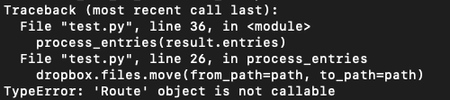
Hi, I am trying to use the API to batch rename file. I had specific questions are around the move_v2 function:
I’m running dropbox.files.move_v2(params), where the args are from_path and to_pa...

Greg-DB Dropbox Community Moderator
5 years agoDropbox Community ModeratorLRomano Thanks for sharing the error. That 'from_lookup/not_found' error does indicate that the issue is that the 'from_path' value doesn't point to anything. That does seem to be because you specified just the name and not the path, as discussed.
The Metadata.path_lower value is just a string containing the path for the item, which might look something like: "/folder/another folder/file.ext".
Since that's just a string, you can operate on it however you need. For instance, you could split it on "/" and take the parts you want, modify them, and build a new path string. Or, you could use a library or module like pathlib to work with it.

LRomano
5 years agoExplorer | Level 3
Hmmmm, actually, it seems to be running ok, but I've had to put in another if statement on has_more = TRUE
Even with the while statement, for some reason it was running the function twice. Any idea why?
result = dbx.files_list_folder(root_path, recursive=True)

full_list = []

index = 0

def process_entries(entries):
    for entry in entries:

      if result.has_more:
        if isinstance(entry, dropbox.files.FileMetadata):
          file = entry.path_lower.rsplit('/', 1)[1]
          if file.endswith(('.mp4','.png','.mov','.gif','.jpg')):
            path = entry.path_lower.rsplit('/', 1)[0]+'/'
            path_original = path+file
            global index
            code = sparkDF.collect()[index][2]
            file_new = code+'_'+file
            path_new = path+file_new
            sublist = [code,file_new,path_new]
            print(sublist)
            print(result.has_more)
            full_list.append(sublist)
            move = dbx.files_move(from_path=path_original, to_path=path_new)
            index += 1


process_entries(result.entries)


while result.has_more:
    result = dbx.files_list_folder_continue(result.cursor)

process_entries(result.entries)- Greg-DB5 years ago
I'm not sure off hand what the issue may be, but calling `if result.has_more` for each `entry` doesn't look like what you'd want to do. Once you're inspecting a particular entry, it shouldn't matter if there is another page of entries to retrieve (since you've already retrieved the entry you're operating on).
I recommend stepping through with a debugger to see where the code execution is going and why, and what the variables look like at any point in time.
Perhaps what you're seeing is the new entries created by your own move operations? You may need to implement some way to avoid operating on files that you've already moved, or maybe retrieve the full file listing before you start moving files, depending on exactly what you want your program to do and how.
- LRomano5 years agoExplorer | Level 3
Hmmmmm, yes that makes sense actually, that the move operation would in a sense 'reset' the file in terms of where the cursor is, and thus might get included in a future operation.
Problem is the full file list is 160k total files across a number of directories, and even counting them all takes ~8 mins.
I think a workaround is to include an if statement to exclue any file that beginswith('str'), as all the strings that I'm appending to files begin with 'zas', but it's not exactly elegant. :)
About Dropbox API Support and Feedback

Get help with the Dropbox API from fellow developers and experts.
The Dropbox Community team is active from Monday to Friday. We try to respond to you as soon as we can, usually within 2 hours.
If you need more help you can view your support options (expected response time for an email or ticket is 24 hours), or contact us on X, Facebook or Instagram.
For more info on available support options for your Dropbox plan, see this article.
If you found the answer to your question in this Community thread, please 'like' the post to say thanks and to let us know it was useful!


