Our Community is in read-only mode until April 8th, learn more here. You can still search existing threads or get help via Dropbox Support, the Dropbox Help Center, or Learn.
Forum Discussion

VyacheslavB
5 years agoHelpful | Level 5
When I try to get a list of files I get a nil in response (Swift 5)
I have a simple method where I want to get a list of the user's files. I took the implementation of this method from your PhotoWatch example. I also added a print at each step to track each step. But...
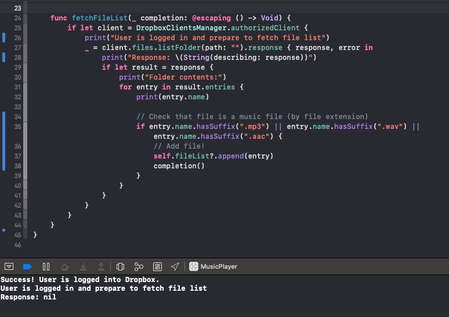
- 5 years ago
You just need to create the ScopeRequest object before calling the authorizeFromControllerV2 method.
As for the error, make sure you're only calling the authorizeFromControllerV2 method once. In your screenshot, I see you're calling authorizeFromControllerV2, and then are also calling a method of your own called "openDropboxAutorization". Are you also calling an authorize method from inside "openDropboxAutorization" by any chance?

VyacheslavB
5 years agoHelpful | Level 5
At what moment should I create a ScopeRequest object?
I try to do this in the Action of the Login button, but at the time of authorization after clicking Alloy, I receive an Error: Optional("Auth flow failed because of inconsistent state.")

Greg-DB Dropbox Community Moderator
5 years agoDropbox Community ModeratorYou just need to create the ScopeRequest object before calling the authorizeFromControllerV2 method.
As for the error, make sure you're only calling the authorizeFromControllerV2 method once. In your screenshot, I see you're calling authorizeFromControllerV2, and then are also calling a method of your own called "openDropboxAutorization". Are you also calling an authorize method from inside "openDropboxAutorization" by any chance?
- VyacheslavB5 years agoHelpful | Level 5
Yes, you are right, I created ScopeRequest twice. Sorry for my carelessness. I finally got a list of files! I am very glad)) Thank you very much for your help!
About Dropbox API Support and Feedback

Get help with the Dropbox API from fellow developers and experts.
The Dropbox Community team is active from Monday to Friday. We try to respond to you as soon as we can, usually within 2 hours.
If you need more help you can view your support options (expected response time for an email or ticket is 24 hours), or contact us on X, Facebook or Instagram.
For more info on available support options for your Dropbox plan, see this article.
If you found the answer to your question in this Community thread, please 'like' the post to say thanks and to let us know it was useful!


