Our Community is in read-only mode until April 8th, learn more here. You can still search existing threads or get help via Dropbox Support, the Dropbox Help Center, or Learn.
Forum Discussion

tragicdev
4 years agoNew member | Level 2
Attempt to rename drive file/folder “not found” (409)
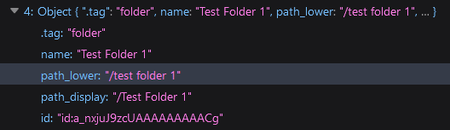
After reading the documentation here to rename an item, I'm not sure why I am getting a “not found” (409). Here is the data of the item provided by https://api.dropboxapi.com/2/files/list_folder ...
- 4 years ago
The /2/file_requests/update endpoint is for updating "file requests", not actual files/folders.
To rename a file or folder, you should use /2/files/move_v2. When supplying the "id" of a file or folder, supply it exactly as given. That is, do not remove the "id:" prefix or otherwise modify the value. To rename a folder, you would pass in the "id" as the "from_path" parameter, and the new path/name as the "to_path" parameter.

Greg-DB Dropbox Community Moderator
4 years agoDropbox Community ModeratorThe /2/file_requests/update endpoint is for updating "file requests", not actual files/folders.
To rename a file or folder, you should use /2/files/move_v2. When supplying the "id" of a file or folder, supply it exactly as given. That is, do not remove the "id:" prefix or otherwise modify the value. To rename a folder, you would pass in the "id" as the "from_path" parameter, and the new path/name as the "to_path" parameter.
 tragicdev4 years agoNew member | Level 2
Thank you! Confirmed this works.
Screenshot of response (200)
About Discuss Dropbox Developer and API

Explore Dropbox Developer & API discussions with developers like you.
The Dropbox Community team is active from Monday to Friday. We try to respond to you as soon as we can, usually within 2 hours.
If you need more help you can view your support options (expected response time for an email or ticket is 24 hours), or contact us on X, Facebook or Instagram.
For more info on available support options for your Dropbox plan, see this article.
If you found the answer to your question in this Community thread, please 'like' the post to say thanks and to let us know it was useful!


