We're making some changes to the Dropbox Community 👩💻 - Find out more here.
Forum Discussion

onna_spyder
4 years agoHelpful | Level 5
files/export returning empty paper docs
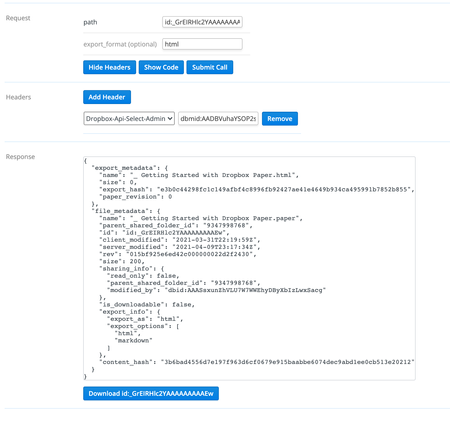
Hey everyone! I'm having trouble getting the actual paper doc content when using the files/export endpoint. When I make the call on the document I do see the relevant export and file metadata att...
 4 years ago
Ended up going with auth on behalf of the user. While using team admin (Dropbox-API-Select-Admin) partially works by returning metadata but no file content, user auth (Dropbox-API-Select-User) does return both metadata and the file content.

kylea Dropbox Staff
4 years agoDropbox Staff
I'm able to export the default getting started with Dropbox Paper file normally.
I see you are using the Dropbox-API-Select-Admin header. Are you able to export the file using user auth?
onna_spyder
4 years agoHelpful | Level 5
Actually yes when I update to use the document's user (Dropbox-API-Select-User) it does return the paper doc successfully. So seems like there may be an issue when attempting to use admin authentication. According to the docs the export endpoint should support admin auth.
One thing to note that I missed is the paper docs I'm having trouble with were actually migrated to use the new paper doc setup. So I think there might be an issue there and I'm working with the technical contact who did the migration.
- onna_spyder4 years agoHelpful | Level 5
Ended up going with auth on behalf of the user. While using team admin (Dropbox-API-Select-Admin) partially works by returning metadata but no file content, user auth (Dropbox-API-Select-User) does return both metadata and the file content.
About Discuss Dropbox Developer and API

Explore Dropbox Developer & API discussions with developers like you.
The Dropbox Community team is active from Monday to Friday. We try to respond to you as soon as we can, usually within 2 hours.
If you need more help you can view your support options (expected response time for an email or ticket is 24 hours), or contact us on X, Facebook or Instagram.
For more info on available support options for your Dropbox plan, see this article.
If you found the answer to your question in this Community thread, please 'like' the post to say thanks and to let us know it was useful!


