Need to see if your shared folder is taking up space on your dropbox 👨💻? Find out how to check here.
Forum Discussion

blehhhh32
2 years agoNew member | Level 2
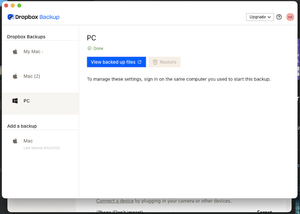
Dropbox Backup: Why is it impossible to disable?
As far as I can find, there's one (and only one) place where Backup settings can be modified -- where you can choose to disable a particular desktop backup -- and that's in my Dropbox Preferences on ...

blehhhh32
2 years agoNew member | Level 2
ok, but that brings me back to the original question... how can I disable a device that's no longer possible to access? Is Dropbox truly this badly designed, that it's literally impossible to remove the company's access to my personal files?

Здравко
2 years agoLegendary | Level 20
First of all, check online on all backups page. If you cannot do anything still there, check your devices list. Again, keep in mind that may be multiple instances for the same machine (matching to every application link). Make sure the machine (or rather link - despite labeled as machines there is list of links actually) matching the backup you want to remove is not linked. Remove it if needed and then get back to backups page to check again. That's it.
Good luck.
PS: Take care not to remove some machine (real link) you need and work with.
- blehhhh322 years agoNew member | Level 2
I appreciate your help!! I'll look into this solution and report back - thank you!
 Nrs_Schubby2 years agoExplorer | Level 3
Hi,
I have the same/similar issue. I have a backup in my profile of a PC that I no longer have access to. I removed the device in settings from the linked devices, but I still cannot delete the backup. I currently have no linked devices. How can I delete the backup?
- Walter2 years ago
Dropbox Community Moderator
Hey Nrs_Schubby - sorry to hear about this.
Are you getting any particular errors when trying to delete it from your backups page?

About Delete, edit, and organize
Solve issues with deleting, editing, and organizing files and folders in your Dropbox account with support from the Dropbox Community.
The Dropbox Community team is active from Monday to Friday. We try to respond to you as soon as we can, usually within 2 hours.
If you need more help you can view your support options (expected response time for an email or ticket is 24 hours), or contact us on X, Facebook or Instagram.
For more info on available support options for your Dropbox plan, see this article.
If you found the answer to your question in this Community thread, please 'like' the post to say thanks and to let us know it was useful!


