Need to see if your shared folder is taking up space on your dropbox 👨💻? Find out how to check here.
Forum Discussion

kevanc
7 years agoNew member | Level 2
Don't see 'sync now' option to prioritise which files sync first
I have a personal dropxox account and am on Mac OS Mojave 10.14.4. I am syncing a large number of files and want to prioritise some larger files first. According to this article https://help.dropbox....
- 6 years ago
Hi -X-ARCH & UnkleRukus!
Sorry to not have provided this information before but if you have a Dropbox Plus, Professional, or Business account, you can prioritize a file to sync ahead of others syncing with the Dropbox app on your computer.
Note: You can’t prioritize folders or package files at this time.
In case you'd like to log a feature request for a similar functionality for folders, the 'Share an Idea' section of our Community is the right place. Here's a direct link:
https://www.dropboxforum.com/t5/Share-an-idea/ct-p/101002000
I hope this clears things up a tad and I'm always around if you have any more questions!

Walter Dropbox Community Moderator
7 years agoDropbox Community ModeratorHey there Sam_Buss - sorry to hear you're having issues with this.
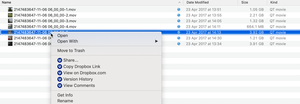
Can you please forward me a screenshot of the options you get when you right click on a file that's still syncing (it will have the blue syncing icon on it) in order to have a better look?
Thanks!

LABANA MUSIC
7 years agoHelpful | Level 6
Hi Guys... I'm having the same problem under mojave ... I cant "sync now" my files!
Any solution??
- Lusil7 years ago
Dropbox Staff
Hey there LABANA MUSIC,
Could you please provide us with more info on this so as to have a better understanding of what you're seeing? For example:
- Is the Dropbox desktop app running? Do you see the Dropbox icon next to your computer's clock?
- Could you also send us a screenshot (without any personal info) of what you see when you right-click on your files?
Any additional details would be very helpful. Thanks in advance!
- LABANA MUSIC7 years agoHelpful | Level 6
HI!
Thanx for the fast reply!
I'm under MOJAVE, and yes the app is running, but stucked since ever on 395 files to sync!
Actually I think is not really syncing at all! ;-(
Some funny request for permission any time and... well, I dont know what to do!
Edited by moderator
- Lusil7 years ago
Thanks for the screenshots, LABANA MUSIC!
Please note that some info included in your screenshots has been removed for security and privacy purposes as per Community Guidelines.
Moving on to your main concern though, please bear in mind that if you have the Dropbox desktop app installed on an external hard drive, you must ensure that the Dropbox folder is available when your computer boots and before the desktop app starts.
If the desktop app starts before the drive mounts and gets recognized by your computer, you'll see an error. You can find more info about this here.
Additionally, since you mention that the desktop app is stuck, I'd also recommend checking if you have any symlinks in your Dropbox folder.
Symlinks refer to data in locations outside of the Dropbox folder, so the desktop app can get stuck attempting to access them and can be the cause of various issues such as poor syncing performance, permissions issues, and data loss.
For this reason, I'd recommend checking this article (step 7) out for more details and relevant steps on how to tackle symlinks in case you find any.
Let me know how it goes!

About Create, upload, and share
Find help to solve issues with creating, uploading, and sharing files and folders in Dropbox. Get support and advice from the Dropbox Community.
The Dropbox Community team is active from Monday to Friday. We try to respond to you as soon as we can, usually within 2 hours.
If you need more help you can view your support options (expected response time for an email or ticket is 24 hours), or contact us on X, Facebook or Instagram.
For more info on available support options for your Dropbox plan, see this article.
If you found the answer to your question in this Community thread, please 'like' the post to say thanks and to let us know it was useful!


