Need to see if your shared folder is taking up space on your dropbox 👨💻? Find out how to check here.
Forum Discussion

Pascale2
7 years agoHelpful | Level 5
Folder upload fails on Dropbox.com
Hi, I just started with Dropbox Plus. I tried to upload large folders to Dropbox, which took quite a long time (sometimes about 2 days for some of the folders).
When the uploading was finished, I got reports mentioning that large amounts of files could not be uploaded (180, 450 files...)!!
Can I resume the uploading of the missing files only? or do I have to remove the whole folder from Dropbox and start uploading again? (with the risk that some files will be missing once more).
BTW, I did not see any Zip folders being uploaded to Dropbox as it's been mentioned in some of the tutorials.
Thanks for the help!
There is. Theres a feature called Selective Sync. In the settings, you go to Sync tab, and go to Selective Sync. You select which folder that you WANT to see on your Hard Drive. The folders that is not picked, the Client will delete from Harddrive but will keep on the cloud. This sounds like what you want.
More info here: https://help.dropbox.com/installs-integrations/sync-uploads/selective-sync-overview

28 Replies
Replies have been turned off for this discussion
- Pascale27 years agoHelpful | Level 5
Thanks! looking forward to reading you!!
- Pascale27 years agoHelpful | Level 5
I cleaned the cached files, and it helped a bit.
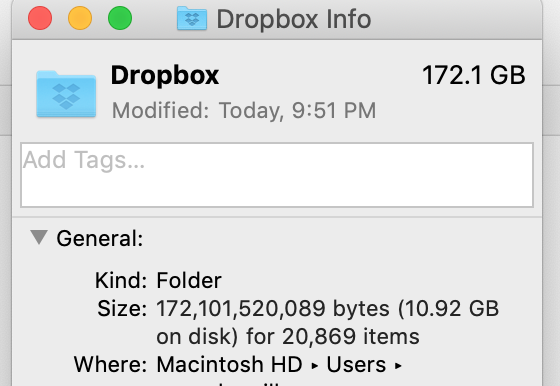
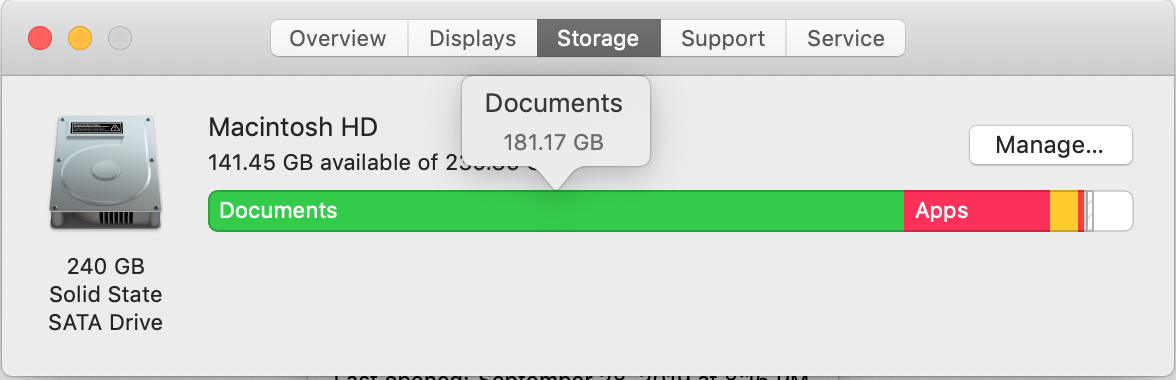
However, it seems that my Dropbox files (approx. 172 MG - see screenshot) remain located on my local drive (181 GB of documents), because, appart of Dropbox I now have a very limited amount files on my local drive.
Is there a solution to prevent the dropbox cloud files to be stored loccaly????
- Chris_J7 years ago
Super User alumni
There is. Theres a feature called Selective Sync. In the settings, you go to Sync tab, and go to Selective Sync. You select which folder that you WANT to see on your Hard Drive. The folders that is not picked, the Client will delete from Harddrive but will keep on the cloud. This sounds like what you want.
More info here: https://help.dropbox.com/installs-integrations/sync-uploads/selective-sync-overview
- Pascale27 years agoHelpful | Level 5
Thanks!!! That was it! Fine that you helped me out!!!
- Chris_J7 years ago
I am very glad to help and also glad that you found what you were looking for
Have a good week
 MaksMaks9915 years agoHelpful | Level 6Sometimes uploading a large set of files we see a message at the end of operation stated that some files are failed to upload to Dropbox. But there is no any button to quickly retry uploading of them.
Our real scenario. We started uploading a folder containing about 10k files. After several hours when the operation was complete we saw the message mentioned above. Opening details we got almost unresponsive (due to the count of files) window with the list of all files. Somewhere in the middle of this list we found those failed files. Some of them were from one subfolder, some from another one. Wasted about 1 hour of my time I collect all failed subfolders. When I tried to upload them again all was fine, files were uploaded.
So my obvious question is why do you force people to waste the time on actions that can be easily do automatically? Just give please ability to rerun upload for failed files/folders.- Mark5 years ago
Super User II
Dropbox isnt designed to be used via the website - its designed to be used via the software on a desktop where auto reuploads etc. automatically happen. The website is intended to be used when your main computer isnt available.
Can you not install the software and upload that way?
- MaksMaks9915 years agoHelpful | Level 6
Dropbox is designed to be used by all provided ways. Some notes about our scenario:
- we have several flash drives
- we want to send content of each drive to Dropbox to make backup and get rid of the flash drives
- we want to use smart sync to not have all the files on local computer
You suggest to use desktop app. But this will force us to copy all files to local Dropbox folder. Obviously we don't want to have thousands of files on the local drive.
Web app should be as comfortable as another ways of Dropbox usage.
Another use case: what if we want to upload files from work computer and not home one and we want to not have desktop app installed?

About Create, upload, and share
Find help to solve issues with creating, uploading, and sharing files and folders in Dropbox. Get support and advice from the Dropbox Community.
The Dropbox Community team is active from Monday to Friday. We try to respond to you as soon as we can, usually within 2 hours.
If you need more help you can view your support options (expected response time for an email or ticket is 24 hours), or contact us on X, Facebook or Instagram.
For more info on available support options for your Dropbox plan, see this article.
If you found the answer to your question in this Community thread, please 'like' the post to say thanks and to let us know it was useful!


