Need to see if your shared folder is taking up space on your dropbox 👨💻? Find out how to check here.
Forum Discussion

mordche
4 months agoNew member | Level 2
Why can't I share files even after upgrading my account?
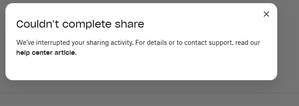
this is what i when i try to share

Dell_Dropbox Community Manager
4 months agoCommunity ManagerJust jumping in to provide some possible explanations and sharing resources from the help center that may shed some light:
Quick Guide
- Wait 24 hours; the suspension typically lifts automatically.
- Reduce link sharing spread – avoid mass automatic downloads.
- For frequent high-volume usage, consider upgrading to Plus or Business.
Common Causes
- Exceeded download or bandwidth thresholds (e.g., Basic: 20 GB/day).
Possible Fixes
- Pause sharing and wait 24 hours for auto restoration.
- Use a paid plan with higher limits or switch to requested link mode.
- Create time-limited shared links to control usage.
Official Help Center References
About Create, upload, and share
Find help to solve issues with creating, uploading, and sharing files and folders in Dropbox. Get support and advice from the Dropbox Community.
The Dropbox Community team is active from Monday to Friday. We try to respond to you as soon as we can, usually within 2 hours.
If you need more help you can view your support options (expected response time for an email or ticket is 24 hours), or contact us on X, Facebook or Instagram.
For more info on available support options for your Dropbox plan, see this article.
If you found the answer to your question in this Community thread, please 'like' the post to say thanks and to let us know it was useful!


