Our Community is in read-only mode until April 8th, learn more here. You can still search existing threads or get help via Dropbox Support, the Dropbox Help Center, or Learn.
Forum Discussion

ATSTAC
6 years agoNew member | Level 2
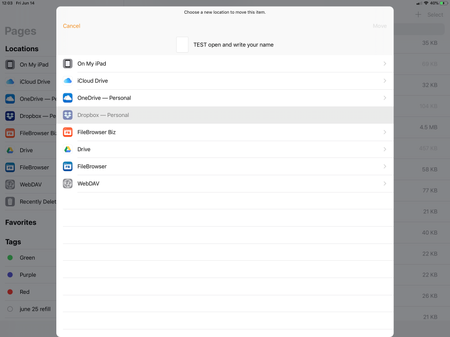
dropbox grayed out/greyed out when attempting to share or move files from ios pages
Before going into details, I have updated to both latest versions of dropbox and pages as of today.
We are tired of dealing with icloud’s behavior and were planning to move over 2,000 files from ic...
- 6 years ago
Hey there brendankai,
Can you let me know if this behaviour is only persistent within Pages? When trying to do a "move" within the Files app, do you also see that Dropbox is greyed out as shown in the screenshot above?
When trying to move items within the File app, choosing the Dropbox folder seems to change the option "move" to "copy" automatically. This may be why you see the option greyed out when "moving", and you would need to "copy" the files to Dropbox and then can remove them from the original location if you need to.
Let me know what you find - Thanks!

Daphne Dropbox Community Moderator
6 years agoDropbox Community ModeratorHey there brendankai,
Can you let me know if this behaviour is only persistent within Pages? When trying to do a "move" within the Files app, do you also see that Dropbox is greyed out as shown in the screenshot above?
When trying to move items within the File app, choosing the Dropbox folder seems to change the option "move" to "copy" automatically. This may be why you see the option greyed out when "moving", and you would need to "copy" the files to Dropbox and then can remove them from the original location if you need to.
Let me know what you find - Thanks!
brendankai
6 years agoHelpful | Level 5
Hi Daphne
Thanks for the response. It looks to be an error from within the "Files" application. I already had Dropbox activated in Locations, however, when clicking around the GUI, re-clicking on Dropbox in Locations enabled the Move to Dropbox feature. Odd.
With Move only being an iOS feature, the move time seems to be lengthy.
I appreciate your assistance. We're good.
- Daphne6 years ago
Hey brendankai,
That's strange indeed! :thinking:
Please do keep me posted if you see this occurring again and we can try and do some further troubleshooting to see if we can pinpoint this.
In the meantime I hope you have a great day - Thanks!
 Guido Walter P.6 years agoNew member | Level 2This worked for me too, thanks!
About Apps and Installations
Have a question about a Dropbox app or installation? Reach out to the Dropbox Community and get solutions, help, and advice from members.
The Dropbox Community team is active from Monday to Friday. We try to respond to you as soon as we can, usually within 2 hours.
If you need more help you can view your support options (expected response time for an email or ticket is 24 hours), or contact us on X, Facebook or Instagram.
For more info on available support options for your Dropbox plan, see this article.
If you found the answer to your question in this Community thread, please 'like' the post to say thanks and to let us know it was useful!


