Need to see if your shared folder is taking up space on your dropbox 👨💻? Find out how to check here.
Forum Discussion

AndPhoto
3 years agoExplorer | Level 4
External drive troubles in Ventura
I just updated to Mac Ventura, and my external SSD started acting weird. If I unplug without properly ejecting the drive, the OS considers it a new drive, and it gets labeled with a number (1, 2, 3, ...
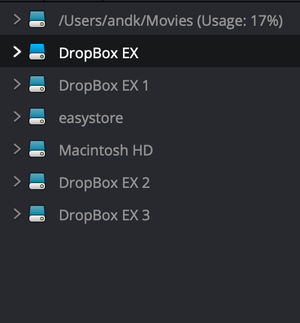

AndPhoto
3 years agoExplorer | Level 4
Technically I am not using the backup feature, this is the actual sync.

Jay Dropbox Community Moderator
3 years agoDropbox Community ModeratorHi AndPhoto, in general, the Dropbox desktop application needs to detect the Dropbox folder before it can begin syncing. If the drive isn't fully mounted before the app loads, then you'll experience the issues you're currently getting.
In addition to that, there are various methods in which the external drive can get disconnected, which can also result in data deletion in some cases.
- AndPhoto3 years agoExplorer | Level 4
That aligns with my experience. I've definitely experienced data deletion. Is there a way for me to relink the drive without having to restart my computer? (It is the only method I've discovered so far).
- Jay3 years ago
Currently, there isn't any method to do so, since the Dropbox folder should always be technically available to the app. While external drives are supported for the Dropbox folder, it isn't recommended for these very reasons.
About Apps and Installations
Have a question about a Dropbox app or installation? Reach out to the Dropbox Community and get solutions, help, and advice from members.
The Dropbox Community team is active from Monday to Friday. We try to respond to you as soon as we can, usually within 2 hours.
If you need more help you can view your support options (expected response time for an email or ticket is 24 hours), or contact us on X, Facebook or Instagram.
For more info on available support options for your Dropbox plan, see this article.
If you found the answer to your question in this Community thread, please 'like' the post to say thanks and to let us know it was useful!


