Need to see if your shared folder is taking up space on your dropbox 👨💻? Find out how to check here.
Forum Discussion

Ivanom
2 years agoExplorer | Level 3
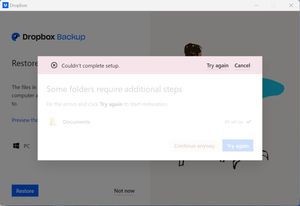
I'm unable to restore my backup
Hi! I'm trying to restore my backup from my previous pc to a new one. However when I try to restore the backup, Dropbox show this message "Couldn't complete setup" ( I'm going to upload a scr...

Nancy Dropbox Community Moderator
2 years agoDropbox Community ModeratorHi Ivanom, sorry for jumping in.
Can you send me a full screenshot of what you see on your Backups page online, as well?
I’d also like you to open your backup settings online, and send me a screenshot of what appears there.

Ivanom
2 years agoExplorer | Level 3
Hi Nancy, where should I go to check the backup settings online? because inside the Backups page online, on the top right, inside the menu "Manage backups" there is a button "Open backup setting" which opens the windows client, not a web page.
About Delete, edit, and organize
Solve issues with deleting, editing, and organizing files and folders in your Dropbox account with support from the Dropbox Community.
The Dropbox Community team is active from Monday to Friday. We try to respond to you as soon as we can, usually within 2 hours.
If you need more help you can view your support options (expected response time for an email or ticket is 24 hours), or contact us on X, Facebook or Instagram.
For more info on available support options for your Dropbox plan, see this article.
If you found the answer to your question in this Community thread, please 'like' the post to say thanks and to let us know it was useful!


