Need to see if your shared folder is taking up space on your dropbox 👨💻? Find out how to check here.
Forum Discussion

twid
4 years agoExplorer | Level 4
Mac OS Ventura - incompatible?
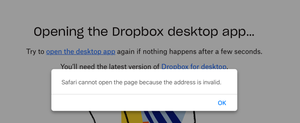
I am a new premium subscriber as of yesterday. I updated to MacOS Ventura on Wednesday. Trying to open the Dropbox desktop app and I receive the error above.
Thanks,
- 4 years ago


radlyeel
4 years agoExplorer | Level 4
I just found this thread a few minuts ago when I upgraded to Ventura (MacOS 13.0.1) I've been a paying Dropbox user for years.. I have an M2 Macbook, and I downloaded both installers mentioned above, Dropbox 161.4.4923.dmg and DropboxInstaller.dmg. Neither one works. At one point I had a "Dropbox.app" in the Applications folder, but all it did was open a Finder window on my local Dropbox folder. Any real help would be appreciated.

Jesus Gerardo M
4 years agoNew member | Level 2
I can seemingly install the Dropbox App from the .dmg without issues, BUT once I open it, I cannot sign in. The sign in button is unresponsive. If I go to Settngs --> Account, I get another sign in button there, which is "clickable", but there's a spinning star looking thing that has been stuck for minutes... (the prompt to enter a password just doesn't pop up at all).
About Apps and Installations
Have a question about a Dropbox app or installation? Reach out to the Dropbox Community and get solutions, help, and advice from members.
The Dropbox Community team is active from Monday to Friday. We try to respond to you as soon as we can, usually within 2 hours.
If you need more help you can view your support options (expected response time for an email or ticket is 24 hours), or contact us on X, Facebook or Instagram.
For more info on available support options for your Dropbox plan, see this article.
If you found the answer to your question in this Community thread, please 'like' the post to say thanks and to let us know it was useful!


