Need to see if your shared folder is taking up space on your dropbox 👨💻? Find out how to check here.
Forum Discussion

Magda1988
3 years agoExplorer | Level 3
Issues with uploading photos from Dropbox to Adobe Lightoom (Classic)
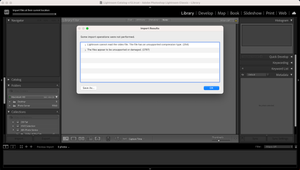
Hi there, I'm trying to upload a big batch of photos from Dropbox to Adobe Lightroom Classic but facing issues with it. I don't have my Dropbox files stored on my hardrive and so the only way that I...

Magda1988
3 years agoExplorer | Level 3
Hi Megan!
Sorry, somehow I'm unable to check the sync status 😕 However, I have my Dropbox set-up so that the files don't get stored on my hard-drive (I guess that's the "online only" setting - essentially, unless I double-click and open a file, it's showing as "online only").
As for my MacOS, I have Ventura 13.5.1 (22G90).
And yes, all the files I'm trying to import are online-only. Is there a way of doing that? Or do I need to make them available offline first and then reverse that? If so, is there a fast way of doing that?
Thanks!

Nancy Dropbox Community Moderator
3 years agoDropbox Community ModeratorHi Magda1988! Sorry for jumping in.
You can try making a file or two available offline first by right clicking on them in your local Dropbox folder, and selecting the relevant option from the dropdown menu. A green checkmark should show next to them.
Does that seem to help?
If yes, you can select all the folders/files you want to download locally, right click on them once, and choose the same option. You may need to wait a bit though for everything to sync, depending on the size of your files.
Finally, you can check the current syncing status of your Dropbox app by hovering over the small Dropbox icon that should be showing in your menu bar.
About Integrations
Find solutions to issues with third-party integrations from the Dropbox Community. Share advice and help members with their integration questions.
The Dropbox Community team is active from Monday to Friday. We try to respond to you as soon as we can, usually within 2 hours.
If you need more help you can view your support options (expected response time for an email or ticket is 24 hours), or contact us on X, Facebook or Instagram.
For more info on available support options for your Dropbox plan, see this article.
If you found the answer to your question in this Community thread, please 'like' the post to say thanks and to let us know it was useful!


