Need to see if your shared folder is taking up space on your dropbox 👨💻? Find out how to check here.
Forum Discussion

Scott H.
7 years agoCollaborator | Level 9
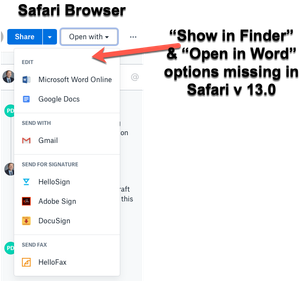
"Open in Finder" and "Open in Word" not showing in Safari OSX for Mac
Hey folks,
When viewing dropbox files from the Safari browser (Safari v 13.0) I can no longer see the "Show in Finder" or 'Open in Word" / "Open in Adobe Acrobat" options for files.
I also have ...

Daphne Dropbox Community Moderator
6 years agoDropbox Community ModeratorHey Michael W., thanks for joining us here!
I was able to find your ticket with our Support team and let them know your comments here, just to keep them in the loop.
This is something that we're looking into at the moment, so thank you for taking the time to reach out to us with this as it will help the team with their investigation.
If there's anything else that you need in the meantime, give me a nudge here and I'd be happy to help.
Hope you all have a great weekend ahead!

Michael W.
6 years agoExplorer | Level 4
Thanks. Yes I did call support. For now I have to use Chrome. Support person said to maybe call Apple about it. I thought about that path but I can open Office 365 no problem in Safari, just not via Dropbox.com. I know it used to work.
I admit that I have noticed more "issues" with Safari lately where I have to go to Chrome to complete. Other loops I get stuck in that don't happen with Chrome. That is why I have had two browser options anyways. This has happened before and then things settle and Safari "works" more consistently. I'm not smart enough to know if this is a Safari issue or problematic "website" programming.
I haven't been happy with anything version 13 lately from Apple...here's looking at you iOS and iPadOS. I guess Safari too.
 Edis6 years agoHelpful | Level 6
Same issue here.
I have contacted support for this issue back in September, too.
Whats the Status on this topic, @Daphne?
About Integrations
Find solutions to issues with third-party integrations from the Dropbox Community. Share advice and help members with their integration questions.
The Dropbox Community team is active from Monday to Friday. We try to respond to you as soon as we can, usually within 2 hours.
If you need more help you can view your support options (expected response time for an email or ticket is 24 hours), or contact us on X, Facebook or Instagram.
For more info on available support options for your Dropbox plan, see this article.
If you found the answer to your question in this Community thread, please 'like' the post to say thanks and to let us know it was useful!


