Need to see if your shared folder is taking up space on your dropbox 👨💻? Find out how to check here.
Forum Discussion

franzxaveer
4 years agoHelpful | Level 6
Dropbox showing wrong device name
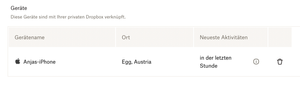
In Dropbox settings > Security a wrong device name is shown.
It is not the Macbook’s name set in System Preferences > Sharing.
Interestingly Dropbox used a name from a friends iPhone nea...
 4 years ago
Hello Hannah.
Thank you for the help.
The advanced reinstall helped me understand that the problem was not on Dropbox’s end.
Changing the HostName of my Macbook did the trick.

Hannah Dropbox Community Moderator
4 years agoDropbox Community ModeratorHey franzxaveer, thanks for bringing this to our attention.
It's really strange for a laptop to be registering as an iPhone, indeed.
Can you try unlinking the device again from your security page and performing an advanced reinstall of the application, to see if that helps?
Keep me posted!
It's really strange for a laptop to be registering as an iPhone, indeed.
Can you try unlinking the device again from your security page and performing an advanced reinstall of the application, to see if that helps?
Keep me posted!
franzxaveer
4 years agoHelpful | Level 6
Hello Hannah.
Thank you for the help.
The advanced reinstall helped me understand that the problem was not on Dropbox’s end.
Changing the HostName of my Macbook did the trick.
- Hannah4 years agoHey franzxaveer, thanks for updating me about this!
I know it's been a while and I'm really sorry for the delay, but I'm happy to see that the advanced reinstall did it.
If you have any other questions, make sure to give us a shout.
Have a great weekend!
About Settings and Preferences
The Dropbox Community is here to help if you have questions about your account settings and preferences. Learn and share advice with members.
The Dropbox Community team is active from Monday to Friday. We try to respond to you as soon as we can, usually within 2 hours.
If you need more help you can view your support options (expected response time for an email or ticket is 24 hours), or contact us on X, Facebook or Instagram.
For more info on available support options for your Dropbox plan, see this article.
If you found the answer to your question in this Community thread, please 'like' the post to say thanks and to let us know it was useful!


