Need to see if your shared folder is taking up space on your dropbox 👨💻? Find out how to check here.
Forum Discussion

clientreleases Dropbox Staff
6 years agoDropbox StaffStable Build 88.4.172
Thanks for using Dropbox! The desktop client is regularly updated with many improvements and fixes.
Download
| Windows | Standard Installer | Offline Installer |
| Mac OS X | Standard Installer | Offline Installer |
| Linux | x86_64 Offline Installer | x86 OfflineInstaller |
Auto-updates: In progress
40 Replies
- Здравко6 years agoLegendary | Level 20
Ehoo... :dizzy_face:
New BUG!!!
Where has move Dropbox folder button gone?
Fix it! Please!
PS: Seems on second try everything is back. But there is something wrong. Why ever (dis)appear initially?
 Typpi6 years agoHelpful | Level 6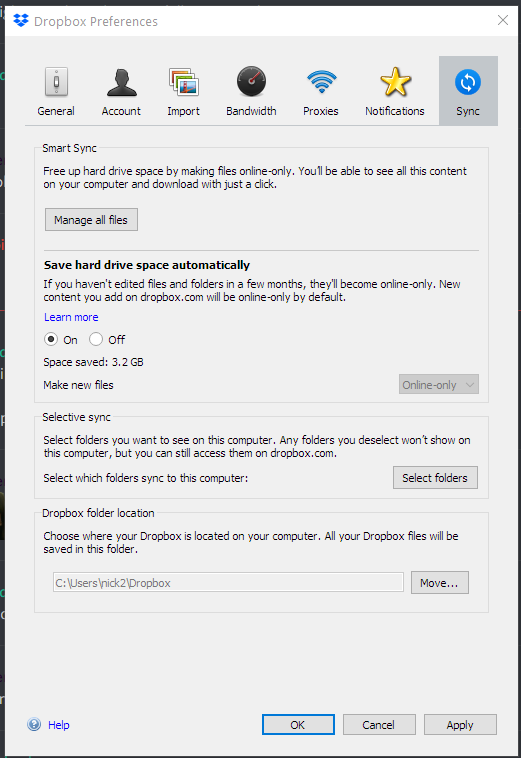
Still here for me.
- Peter H.876 years agoCollaborator | Level 10
That's interesting because I have got the "Smart Sync" / "Selective sync" / "Dropbox folder location" like Typpi, except that I don't have the "Save hard drive space" subsection in Smart Sync. But I do have a checkbox for "Let my admin manage this setting".
Assume DB are testing some different options with different users?
 bobas6 years agoThanks for using Dropbox! Here are the user-visible changes in v88:
- Linux-only: Included "libatomic" library with Dropbox so it works out of the box on Ubuntu Server and Fedora.
- Resolved an issue where if you started typing into the folder overview your insertion point would sometimes move while typing.
- Improved experience when two or more people are editing the same folder overview at the same time.
- Fixed a rare issue that caused Microsoft Excel instability when Dropbox Application was running
- dm2live6 years agoNew member | Level 2
Mine updated and is stuck "Syncing" on PC. All the files show up with the blue sync Icon, been hours and nothing has changed to a green check mark. Dropbox works fine still on my second computer a macbookpro. Anyone else having this issue? Attempted to uninstall and reinstall, unlink/link, no avail. First time this has happened.
- martin_at_home6 years agoExplorer | Level 3
Same issue here;
I'd be happy to leave it to sync "only" all 140 GB, but
1) What casue it to resync (and will it happen again.. and again ...)
2) the rest of the myu users (the gamers and netflix watchers) are getting very annoyed at the network hog (yes, I've restrcited the bandwidth, but I currently don'yt have muuch faith ...)
hth
 Jeremy N.26 years agoHelpful | Level 7
Same here - full resync been running ever since I rebooted my machine about 3.5 hours ago.
- Jeremy N.26 years agoHelpful | Level 7
Continually-runing resync... A 'chat' with support highlighted that my problem seemed to be a sync that was stuck - the systray icon showed no info but the progress info in the GUI showed 1,688 files being synced. Then that'd change to 1687 then back to 1688 then 1677 then 1688, occasionally a few more then back to 1687/1688.
I also noticed ffrom 'Process Hacker' (a sort of super-Task Manager) app that the DB client application had apparently read 1.8 TB of data since starting some hours ago... but there's only 130 GB of files in my DB. I don't know how much data you'd expect a reindex to read, but as hardly any of my files had changed since shutting down the machine last night and the reboot this morning after which the reindex etc started, I thought that that increasing read total, and the resync file count not decreasing meant that DB was perhaps reading and trying to sync one file over and over again. The #files count would go up occasionally when something else in my DB got saved (eg my notes on what I was doing) then come back to the same sticking point.
I'd also noticed (through a monitoring process I have here) that I'd gained a "conflicted" file (a notes file that had been updated shortly after I rebooted this morning). It's the first "conflicted" file I've had in several years, a symptom of the reindex/resync problem rather than a conflict between two machines accessing the same file.
Anyway, I shutdown the DB client, then manually sorted out the diffs between the conflicted file and the genuine one, then restarted the DB client. And the high cpu use etc has gone away. The client now seems to be behaving again.
- Arch_Darter6 years agoHelpful | Level 6
Same problem.
In windows 10 v1909, dropbox client v88.4.172 constantly sync forever...(about 2 days).
MacOS client still working fine.  June16 years agoExplorer | Level 4
Same issue here. All files started on blue circle/syncing, with slow progress. I shut down and rebooted, and now nothing is syncing, the dropbox icon in the menu bar is stuck in "started..." with no progress whatever.


About Dropbox Desktop Client Builds
Download the latest Dropbox beta or stable build.668 PostsLatest Activity: 10 hours ago
The Dropbox Community team is active from Monday to Friday. We try to respond to you as soon as we can, usually within 2 hours.
If you need more help you can view your support options (expected response time for an email or ticket is 24 hours), or contact us on X, Facebook or Instagram.
For more info on available support options for your Dropbox plan, see this article.
If you found the answer to your question in this Community thread, please 'like' the post to say thanks and to let us know it was useful!