Need to see if your shared folder is taking up space on your dropbox 👨💻? Find out how to check here.
Forum Discussion

DBXCommunity Community Manager
6 years agoCommunity ManagerWhat’s new: Scanner App
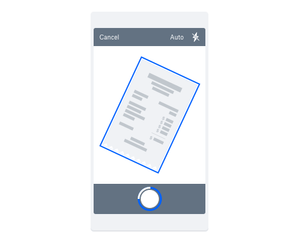
There’s nothing worse than forgetting an idea, or losing an important piece of paper. The one thing we never lose, and usually don’t forget is our phone - so now with the Dropbox Scanner App, you can...

Badjer
6 years agoCollaborator | Level 9
The ones I would be excited about would be photos, sketches, whiteboard, handouts, etc if it means that you can search thru it via search/ OCR/ whatever term you want to use.
To say that you want to digitalize things, to never lose a big idea, never be rushed about losing your meeting notes only works so far with scanned notes. If all it does is convert it to png/ pdf/ etc then it only helps to a certain point. Basically becomes a dumping ground since the more info you have the harder it is to find if you are limited to folders only without tags or the ability to add text notes
Searching within the images makes this very useful. Many times I use notes in class etc but once again it is only helpful to a given point if the OCR cannot search the handwritten text
It would also be helpful if there was an ability to convert images already in DB to searchable images vs finding the paper doc again (if you still have it) & scanning it.
 Gregg T.6 years agoHelpful | Level 6i have not tried the OCR features, but if it turns it to work for your situation, you can snap pictures of your image-based document (already in dropbox) by displaying it on a second screen. so open the document on a computer/tablet, zoom to the largest size, and use your phone to snap the picture into your app. you’d have to page thru the document (what a pain for a long document!), and images might lose crispness, but if it saves time overall, it might be worthwhile.
finding the right document, especially if you have lots of them in a small number of folders, is a challenging issue for me. i try to pack essential “keywords” into the filename, but usually that’s not enough. you could consider using the dropbox searchable comments/tags to store more keywords. the issue for me is remembering the keywords a year later when it’s time to search. google had a feature to index files — i don’t know if they do support that — by installing the google search engine in your computer so you’re not exposing your private files to the world. dropbox should replace their search engine with google’s engine, i think.- Badjer6 years agoCollaborator | Level 9I have not been able to make comments come up in the search results. It was one of my thoughts as well to create a hack tag system of sorts. Would be greatbidea if it could work
- Gregg T.6 years agoHelpful | Level 6I’ve read that searching tags only works in the desktop app, but not thru the website. I wonder if the original author who started this was using windows comments and not dropbox tags. in any case, if the feature is not implemented everywhere, it’s somewhat useless for my usage patterns.
About Latest News
111 PostsLatest Activity: 3 days ago
The Dropbox Community team is active from Monday to Friday. We try to respond to you as soon as we can, usually within 2 hours.
If you need more help you can view your support options (expected response time for an email or ticket is 24 hours), or contact us on X, Facebook or Instagram.
For more info on available support options for your Dropbox plan, see this article.
If you found the answer to your question in this Community thread, please 'like' the post to say thanks and to let us know it was useful!


