We’re Still Here to Help (Even Over the Holidays!) - find out more here.
Forum Discussion

notebynote
7 years agoExplorer | Level 3
Selektive Synchronisation, dennoch alles mit Smart Sync
Hallo,
ich habe die selektive Synchronisation ausgewählt und explizit SmartSync nicht aktiviert. Dennoch werden alle Dateien, die ich auf der Festplatte haben will, grundsätzlich "nur online" verwa...
- 7 years ago
Hallo zusammen,
danke für die neuen Beiträge!
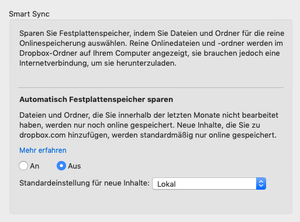
notebynote: Die in Ihrem Screenshot gezeigten Einstellungen betreffen eine Unterfunktion von Smart Sync, „Automatisch Festplattenspeicher sparen“.
Wenn Sie Smart Sync für Ihr Dropbox-Konto komplett deaktivieren möchten, so können Sie hierzu einfach die „Dropbox-Systemerweiterung“ deaktivieren.
Bitte rufen Sie dazu diesen Link auf. Bitte setzen Sie dann die Einstellung für die Dropbox-Systemerweiterung auf ‚AUS‘.
Weitere Informationen zu diesem Thema finden Sie in diesem Hilfeartikel.
Beste Grüße

Werner Dropbox Staff
7 years agoDropbox StaffHallo zusammen,
danke für die neuen Beiträge!
notebynote: Die in Ihrem Screenshot gezeigten Einstellungen betreffen eine Unterfunktion von Smart Sync, „Automatisch Festplattenspeicher sparen“.
Wenn Sie Smart Sync für Ihr Dropbox-Konto komplett deaktivieren möchten, so können Sie hierzu einfach die „Dropbox-Systemerweiterung“ deaktivieren.
Bitte rufen Sie dazu diesen Link auf. Bitte setzen Sie dann die Einstellung für die Dropbox-Systemerweiterung auf ‚AUS‘.
Weitere Informationen zu diesem Thema finden Sie in diesem Hilfeartikel.
Beste Grüße

notebynote
7 years agoExplorer | Level 3
Werner, danke für die Antwort. Ich habe nun die Systemerweiterung ausgeschaltet. Leider habe ich das nicht schon vorher gewußt, dann hätte ich mir sehr viel Ärger ersparen können. Smart Sync ist eines der Features, die mich dazu bewogen haben, Dropbox zu verlassen. Wäre die Funktion verlässlich, dann wäre sie vielleicht auch nützlich. Letztlich haben Sie das Problem, warum sich die selektive Synchronisation auf meinem Rechner anders als erwartet verhält, nur durch das Ausschalten von Smart Sync umgehen können. Eine echte Lösung sieht für mich anders aus, dann wäre man dem Problem auf den Grund gegangen.
- Werner7 years ago
Hallo notebynote,
danke für die Rückmeldung!
Es freut mich zu hören, dass zumindest die Frage hinsichtlich Smart Sync geklärt werden konnte.
Sollte es weitere Fragen oder Klärungsbedarf geben, sind wir gerne für Sie da.
Beste Grüße
[Diese Diskussion wurde geschlossen. Wenn Sie eine ähnliche Frage haben, können Sie hier einen neuen Beitrag erstellen]
About Eine Frage stellen

Sie haben Fragen? Richten Sie sie an die Dropbox Community!
The Dropbox Community team is active from Monday to Friday. We try to respond to you as soon as we can, usually within 2 hours.
If you need more help you can view your support options (expected response time for an email or ticket is 24 hours), or contact us on X, Facebook or Instagram.
For more info on available support options for your Dropbox plan, see this article.
If you found the answer to your question in this Community thread, please 'like' the post to say thanks and to let us know it was useful!


