We're making some changes to the Dropbox Community 👩💻 - Find out more here.

rfog
5 years agoCollaborator | Level 9
Status:
Closed - Inactive
Be able to change Dropbox backup folders names on individual accounts
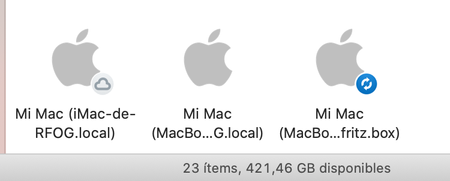
Add possibility of rename Backup folders. If you have only one computer, it go fine, but if you have more than one, it ends being very confussing. Due iCloud Drive issues, I've changed all of my Macs...

chadbush
4 years agoExplorer | Level 4
This is truly ridiculous. I already had a fully working backup system in place, whereby I kept all the directories I wanted to backup in my Dropbox folders, then symlinked certain ones into Dropbox from my system where the system required it. I saw an invitation in the Dropbox app to try the new backup feature, so I rearranged everything, re-synced hundreds of GB of files, and now I'm stuck with a Dropbox folder called "Mac (2)" that I can't change.
This renders the entire backup feature unusable for me. I do a lot of command line work, and having spaces, parentheses, extraneous characters or, frankly, anything I didn't choose in the path to all my synced files is a deal breaker.
I'm now going to have to turn off backups, rearrange all my directories and files as they were, create symlinks as needed from outside Dropbox into the files I've moved there, and use a more clunky system that has worked for years, just to avoid having this ridiculously-named folder in the path that Dropbox won't let me change, and won't even take seriously as a feature request. I'm angry.