2025 sparked some incredible conversations across our community 👩💻. Discover the highlights and see what’s ahead in 2026.
Mac
1689 Topics 0Views0likes0Comments
Dropbox Indexing - Why on EVERY restart?
Using a M3 Ultra Mac Studio, Sequoia 15.5, with Dropbox v239.4.8301 running on an external drive. This issue has been an issue since last June, and I have been lucky to avoid any major issues until today. Whenever I restart/shut off and turn my computer back on, Dropbox always has to go through the process of re-indexing everything. I work off of dropbox directly, and use shared folders to send files back and forth with collaborators/clients/etc. After I did a necessary restart for an unrelated software issue (Pro Tools for the work I do), and naturally the indexing process had begun. However, it's been going on for the past 5+ hours, and the work I completed this morning can't be sent until dropbox is done indexing, and my collaborator can't access any of my work until dropbox has completed the indexing process. We are under tight deadlines, and we have lost half a day due to this issue. Is there anyway to stop dropbox from re-indexing everything on startup? This was never an issue in the past, and I would rather not have to change my workflow, but I desperately need this to be resolved.2Views0likes0Comments
Why does dropbox hijack my screenshots?
How to stop dropbox from taking my screenshots. The solutions privided do not work. There is no way to get the app to load on a mac. Opening the dropbox icon, which is supposed to open the app just opens the folder. The App never opens so the preferences section is never available to fix this screenshot hijacking issue. This is a known issue why is it not fixed?23Views0likes4Comments
I can't see any syncing icons or right-click Dropbox menu options on my macOS Sonoma.
App: Dropbox (latest version) 239.4.8301 Devide: MAC book PRO 14 inch, 2023 Operating system: Sonoma 14.7.5 I can't see both syncing icons and right-click menu options on my laptop. This happens after remove an old account and sign-in into a new profile (part of Dropbox Teams) I try everything that was suggested, like re-installing, restart, log-out etc.etc. Currently the only way to sync file on dekstop is to open them and this make me lose a tremendous amount of time (link packages of indesign with more than 500 files, just to make an example). Can you help me with that? Thanks53Views0likes6Comments
macOS Sequoia 15.5 - Getting a message that "The application couldn't be found", after an update.
I've been a Dropbox user for many years. Within the last few months, whenever Dropbox automatically updates on my Mac currently running macOS 15.5 I've noted that in Finder I will see a message above files in my Dropbox folder of "The application "Dropbox" could not be found." and nothing will sync, even though Dropbox is running. Rebooting my Mac seems to resolve the issue as everything works properly after a reboot and the message is gone in Finder. This seems like a recent bug as Dropbox didn't do this for many years on my Macs. I'm not sure how to prevent the issue from happening the next time an update rolls out, or what to do to "fix" this as an end user other than a reboot. It's not the end of the world, but it's a regression and is a bit annoying.1.8KViews0likes59Comments
I reinstalled the Dropbox desktop app on my macOS Tahoe and have two questions.
Device iMac (M1, 2021) Operating System/Browser (if using the web) MacOS Tahoe Dropbox App Version (if using the app) 238.4.6305 Question or Issue My Dropbox folder is on an external 4 TB SSD. Yesterday I deleted the Desktop app and erased and reformatted the external drive. I reinstalled the Desktop app and reinitiated the sync via the web portal. Everything seemed to progress well. All of my folders appeared on the drive. and after indexing my files populated the folders. I have access to all of my files from the external drive. I have 2 questions. Prior to yesterday's reinstallation my files occupied 2.76 TB on the external drive. As of this morning they occupy .33 TB. What could account for the size discrepancy? Are my file really on the external drive? I completed the reinstallation, and all files were present on the external drive, at noon yesterday. Since that time the Desktop app has been updating. My sense is that something is wrong. It shouldn't take this long to update the files. I have purposely stayed away from making any changes to the files. Should it take this long to update? ThanksSolved54Views0likes11CommentsMy macOS desktop app crashes each time I try to install or open it.
Application Affected Dropbox App Device Mac Studio (Apple M1 Max) Operating System/Browser (if using the web) macOS Tahoe Version 26.2 Dropbox App Version (if using the app) Tried multiple versions, including the most recent offline installer. Question or Issue I am trying to install the Desktop application for Dropbox. However, each time I try and install or open the application, it simply crashes. In order to get it to stop, I have to open Activity Monitor and force quit. The issue is the same when using the offline installer. The only difference is that the actual application icon does not make it to my Applications folder.19Views0likes1Comment
AI Assistant to understand contents and organize Dropbox files
I’m a personal plan user and would like to request an AI assistant that can actively organize my Dropbox, not just search it. What I’m looking for is a chat-based AI that can understand the contents of my files and folders and: - Execute direct instructions (e.g. “Rename these files using this pattern”) - Propose organization actions and apply them after confirmation Examples of actions: - Renaming files based on their content and a given naming pattern - Moving and grouping related files into appropriate folders - Identifying duplicates, similar, or outdated files and deleting or archiving them Dropbox Dash is a great step for discovery, but I’m looking for AI that can turn intent (“this belongs with that”) into actual file operations inside Dropbox.27Views1like1CommentDropbox is stuck syncing 60K files or 118GB and taking ~200% CPU
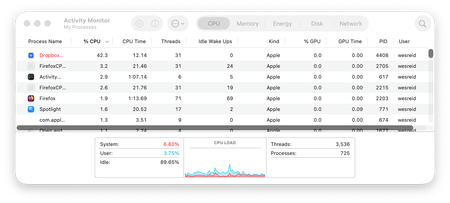
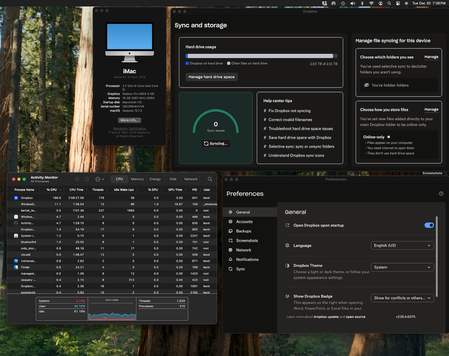
Device iMac 2019 27-inch Retina 5K Operating System/Browser (if using the web) Sequoia 15.7.2 Dropbox App Version (if using the app) v238.4.6075 Syncing Status "Syncing 60,850 files " Question or Issue I recently updated my mac OS to Sequoia 15.7.2. Since that update my dropbox has been stuck at syncing thousands of files and has severely slowed my computer to the point that I can't use it (painfully slow and chugging along for a simple task). As you can see in the screenshots, it's no wonder since it is taking up so much CPU power (180-200%). For the first few days I've tried to let it run but the number of files had jumped up to double what it is with nothing actually going down. Important things to note: 1. new files are getting synched despite it syncing all these other files. I can see the updates in my other computer. 2. at around the same time I updated I attempted to have dropbox backup my photos as well which is the largest files and it could also be related to this slowing. I did this right after I updated my OS. As a result, I changed the dropbox settings and turned photo backup and syncing off (I had never synced my photos to Dropbox before). I also deleted any previous backups just to be sure and paused backups entirely. Please help!! My iMac is unusable and I need it for work. I almost attempted to delete everything and do a fresh sync but I'm worried it will just aggravate the issue and cause a full file sync even larger than what it is now. I can't tell if this is in some stuck problematic state or if it is in fact synching so many files because of some recent change (FYI I did not update that many files on dropbox that would warrant that large sync) .49Views0likes5Comments