We’re Still Here to Help (Even Over the Holidays!) - find out more here.
Dropbox Spaces
18 Topics
409 no_write_permission
Hi, I am using dropbox in n8n and have connected a dropbox team account. But I am getting 409 no_write_permission error. It was working fine a few days earlier but now I am getting this error for no reason. I changed nothing in n8n, nor in my dropbox settings. It was working fine a few days ago. It happened before too, and it got resolved after reconnecting and create a new node. But I am getting the same error again. Why am I getting this error and what is the fix. Please help me out! complete error: 409 - "{\"error_summary\": \"path/no_write_permission/.\", \"error\": {\".tag\": \"path\", \"reason\": {\".tag\": \"no_write_permission\"}, \"upload_session_id\": \"pid_upload_session:ABIJdIKguQwyyRnlJPP0VU6cKu7yvOT0Xo4yZCllqv3074TJtg\"}}"Solved323Views0likes5CommentsBack to school - forget the lunchbox, organize everything else
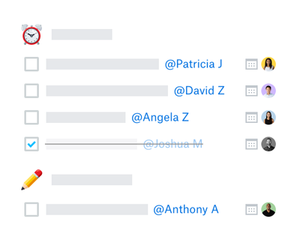
It’s that classic back to school time of year, and whether you’re a student, a teacher, an administrator or have a friend or family member going back to school, here is a list of things to make your day easier! Create a folder system in Dropbox that makes sense Before you start classes (teaching, learning or organizing them), you should take the time to create a folder system that makes sense for you. Whether it’s by class, by file type, by how much you hate or love a subject is entirely up to you, but make sure there is a sensible place for your files to go, once they start flying in! Create a to do list that you update daily or weekly with Paper This is something my student-self should have done - but it’s something my work-self does and I cannot recommend it enough! Yes, we all have tools and emails and reminders but a humble to-do list can really create a clear headspace, where you can see what’s on your plate in as much or as little detail as you need. With Dropbox Paper, you get that satisfying tick sensation, without the actual paper waste. Create a project calendar, and link important dates to your to do list The start of term is heavy with dates - finals, papers, labs, whatever it is - get it in your calendar now. Dropbox integrates with both Google and and Outlook calendars, so you can link to the documents, the curriculum, whatever you think will be useful when you’re two days from the deadline. Create your group project folders ASAP If you know you have a group project coming up, create the work space asap with Dropbox Spaces, and add people as soon as you know who you’re working with. The earlier you’re all on the same page (literally), the better! Make the most of the Scanner app Now you can save, organize, and share important documents right from your phone with the Dropbox Scanner App. Scan in materials from classes or seminars for easy reference— they’re a lot less likely to get crumpled or torn in a digital setting! Zoom integrations There’s a high chance some of your back to school experience will be happening on Zoom, so make sure you have that integrated to save time. You can learn more about that here. These tips might make your day a little easier, but we want to know, what are your back to school Dropbox tips?2.5KViews4likes0CommentsIntroducing Dropbox Spaces
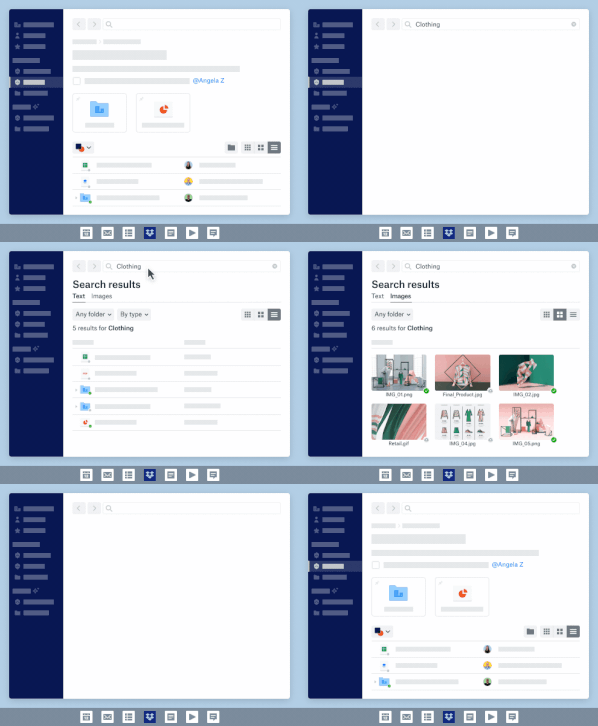
Dropbox Spaces transforms your folders into connected workspaces that bring your team’s content and tools together—from PowerPoints to Google Docs, Trello boards, and more. Spaces is accessible via the new Dropbox desktop experience, dropbox.com, and the Dropbox mobile app. Here are some highlights of what's new and what's coming soon! Image Search Save time getting to the images you need by searching for what you see in the image across JPG, JPEG, PNG, and GIF files. Image search is rolling out to Dropbox Professional from the 25th September on desktop and web, and coming soon to Dropbox Business plans. File previews Preview files in high fidelity—including AutoCAD files—right from your desktop even if you don't have the native application installed. Overview notifications Close the loop on the progress of shared work by getting notified when updates are made to folder overview descriptions and to-dos, so you can get in sync and keep on schedule. Search highlights Coming soon to desktop and web—Easily search for key phrases across text within files and overview descriptions to find what you're looking for, even if you don't remember what file or folder it's in. To learn more about Dropbox Spaces and other new features check out - Introducing Dropbox Spaces11KViews6likes0Comments