We're making some changes to the Dropbox Community 👩💻 - Find out more here.
Share
1527 Topics
All my Dropbox shared links suddenly stopped working
Hello, I'm encountering a major issue with Dropbox sharing, and I’m trying to understand what’s going wrong. It seems that all of my shared links are no longer accessible to external users. When I open them while logged into my account, everything works fine. However, if I test the same links in a private/incognito window (or from another device not logged in), I get an error message and the files cannot be accessed. Additionally, when I try to create a new shared link with expiration settings, it also fails and returns an error. Here’s what I’ve observed: Existing shared links → only work when I’m logged in External access → error message (file unavailable) Creating new shared links with expiration → error Issue seems to affect all files, not just one I’m wondering: Could this be related to a temporary restriction or bandwidth limit? Has my account or some content been flagged or restricted? Is there a way to view logs or identify problematic files that could cause this? If anyone has experienced something similar or has insights, I’d really appreciate your help. Thanks in advance!18Views0likes1Comment
How can my client send me files larger than 5GB, if they don't have a Dropbox account?
I have dropbox plus account. My client does not have a dropbox account. Nor does he want one. How can he send me files that are 5gb and up? I'm always getting hit with the 2gb limit. I'm in video production and 2gb files are nothing. We work with files that range from 2gb to 50gb. We don't want to make our clients open accounts that they don't want. Thoughts? Thanks.Solved64Views0likes5Comments
I sent a "File Request" to a free account, but the person can't send me large files.
I have a 2TB Pro plan, and I'm sending a "File Request" to a friend which has a free account, but he still can't upload files larger than 2GB in that shared link. And even then, that goes against his free quota. What am I doing wrong? How can I have him upload larger than 2GB files at once against my quota, not his? Thanks, GregSolved109Views0likes7CommentsCan I stop external shared link recipients from being prompted to sign up?
Hi, I am trialing dropbox advanced ahead of possible rollout. It works well on the team side, but when i share a link for an external user to browse - once they try to download it aggressively prompts them to sign up with a tiny 'download only' link. Its a deal breaker for us, it looks unprofessional and we know customers will either not download the files or will ask us to share another way. Can it be surprised when using paid versions of dropbox?59Views0likes4CommentsI can't share any folders or files because my sharing activity was interrupted
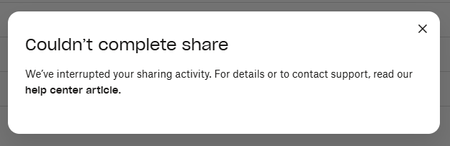
Device Dell Slim ECS1250 Operating System/Browser (if using the web) Windows 11 Pro Dropbox App Version (if using the app) 244.4.6580 Syncing Status Up to date Question or Issue I am not able to share any files or folders. Get the "Couldn't complete share" error message but without any further explanation. I have checked all possible reasons referred to in the help center to no avail...52Views0likes2Comments
File edit access in view only folder
Dropbox Plan (Personal) Are you a Team Member or Admin? () Do you have access to the email linked to the account? (Yes) Are there any devices connected to your Dropbox account? (Phone.) Question or Issue I have shared a folder and set permissions to view only. I want to give edit access to a single file within the folder, but when i select Manage Permissions, the permissions for all users is ghosted and can not be changed. I am the folder and file owner. Is there a way for me to change edit permission of individual files?67Views0likes2Comments
Suggestion for new additional product
Good day, I am a user of dropbox and I have some suggestions I would like to share with you. Please note that I am not a technical person and can't advise on the creation process. But I can at least state why to take my suggestion from a business standpoint. I want to cover an approach that I believe would be a benefit to your company. This approach being looking at transferring and sharing files not just through cloud but making use of direct sharing methods between devices and creating better ease of use. For the sake of referencing, I will refer to this core concept as 'ease of direct sharing'. In my opinion, Dropbox's value was not just use of cloud but making transferring, sharing and backing up files easier. And because of that, I believe Dropbox can achieve success through this approach I am suggesting. I will breakdown now by what I'm actually suggesting to do as well as explain what I mean by direct sharing methods. When I'm referring to direct sharing methods I am speaking about methods you are aware of. Those being: Bluetooth Wi-Fi direct Nearby share Over LAN network Wired (USB cable) I'm certain you used each one of these methods to transfer files before. And I'm certain you know how frustrating it can be to use these methods depending on which circumstances it is. For example, Using Bluetooth to transfer files from your phone to your PC. Not extremely difficult but compared doing it with phones, quite annoying. Another example. Using Wi-Fi direct from android phone to your PC. Right now, nearby share (quick share) exists but it is not very straight forward for a user on how to setup and use and is difficult to adjust certain aspects of the transfer. Another one is using nearby share from pc to PC. What about transferring from your IPhone to your PC? Have you ever attempted to transfer files from PC to PC via USB cable? I won't go through every scenario here. My point is that we have all these technologies for device to device sharing but it still not as seamless as it could be. There are existing solutions to all these scenarios but requires different applications for all of these scenarios. There is no single product that helps make this all easier. I believe Dropbox can make that product. I think if certain aspects were done for this approach, it could bring great success. Those aspects being: Create a file explorer application, at least for mobile. Make sure this new application can do certain functions. And create sync not just for cloud but for device to device. First aspect - create a File explorer It is to either create a file explorer application or add it as a feature. At the very least, create one for mobile devices and add it as a feature for the computer applications. The file explorer is for 2 reasons. First reason is that, in the Android environment, in my opinion, I believe there is a desire for a proper and robust file explorer for those who often manage their files manually. I would recommend creating the explorer at the level of something like ‘ES file explorer’ which allows for more features than most basic file explorer apps. The second reason is that it will be the center of making use of all these features and functions that will be added. Second aspect - functions that should be added Note: When I state any device, I will be referring to Android phones, IPhones, Android tablets, IPads, Windows computers, Macs & Linux machines (particularly those running Steam OS). These are the fundamental functions that the application should be able to do: The application should allow and make easy the transfer of files between any devices when done via Bluetooth. The application should allow and make easy the transfer of files between any devices when done via Wi-Fi Direct. The application should allow and make easy the transfer of files between any devices when done via Nearby share. The application should allow and make easy the transfer of files between any devices when done via LANNetwork. The application should allow and make easy the transfer of files between any devices when done via Wired (USB cable). The application should be able to easily turn a device into a FTP server which can be found and explored through the application on another device. This would be over Bluetooth, LAN Network, Wi-Fi Direct or Mobile Hotspot. The application should be cross platform. Those being Android, IOS, Windows, Mac and Linux (particularly for Steam OS). The application should allow for transfers of multiple files through a single request. The application should allow for transfers of a whole folder or multiple folders through a single request. Third aspect - creating Syncing function I would like to propose creating the function to sync files and folders directly between devices. Cloud would not be the medium but rather direct sharing methods would be used. I believe many people would like to use Syncing between devices as cloud can still be a bottle neck to them. There are 3 types of Syncing functions I would like propose. The First type would be, as mentioned before, syncing files and folders through the use of direct sharing methods. It is as it sounds. Similar to Syncing with cloud, the devices mirror each other. The second type would be Syncing from cloud to device, at least for mobile. I am aware that Dropbox and other Cloud services have an offline feature but for mobile, as far as I am aware, the files are only accessible through the app. This function is so that the actual files are there to use like regular files. Along with this, I would suggest providing the same service with other Cloud services. This will help you gain some users from other Cloud services customers. I would recommend looking at Metactrl about this as they have apps that do this already. I'm sure you're aware them as they already have Syncing for Dropbox, probably using an API Dropbox would have made. You could partner with them as to power the function in the application. The third type would be Syncing devices with physical storage media (flash drives and hard drives). What I have in mind is where, after a setup process, a flash drive can be inserted into a device and the files can be synced automatically. I believe there are many people who would still prefer to keep copies of files on flash drives as backups but it is often quite annoying to manually browse through the files and copy and paste the files regularly. This concludes my suggestion. There are some more aspects I wanted to discuss but I'll leave it at the core points. I very much believe this approach will be a benefit to your company. In my opinion, Dropbox at its core is not about cloud but making existing technology easier for others to use. If you are interested in my suggestion and have more questions, please feel free to reach out to me. Kind regards, Marc Harrilal157Views1like6CommentsHow we use Dropbox: Project management
When we hear about how other people use Dropbox, I have to say we scan for tips and advice that we can carry through to our own workflows and projects, from planning a wedding to organizing family photos. With that in mind, we loved hearing about how Project Manager extraordinaire, Libby, uses Dropbox to keep her projects, and more importably, the team, on track. Check it out below and let us know if you will take some of these tips forward 😁 The key to a successful project is good planning and organization. Duh, but here is what I do to start off on the right foot there. Step 1: Create a shell of folders to start a project I create all of the folders to help manage the different stages of a project, which include: Ideation Planning Execution and closure And to go even deeper, within these folders we can have sub folders for different levels of approval. At this stage, I add everyone involved in the projects - and I BEG them to create their documentation within these folders. There is nothing worse than people creating rogue docs and forgetting to link it back so starting off in the right place makes it easy to keep us all in contact. Step 2: Create a Project plan I then create a Project Plan Paper doc, and this outlines the goals of the project, and this outlines the goals of the project, milestones, results and more. Now, this can seem daunting to begin with but luckily, we have a template to get you started right here. Within this doc, I can also tag people, create and add to-dos, link to other docs and of course, adding tables and images seamlessly. The perfect one pager, if you ask me. Step 3: Track the progress In theory, now everyone can get to work on their own sections of the project, and I get to observe, check in and remove any blockers. So I get notified when changes are made, I get tagged, I receive Capture updates. Whatever works for the team works for me! Step 4: Reporting and sharing wider Once the project has finished, and undoubtedly been a resounding success, it’s time to report back. So the results folder can contain Exel sheets of data, screenshots, and docs summarising the impact of the project. It’s great because everyone can contribute to this section as the results often come from varying sources. Once docs are ready for sharing wider, there are executive one pagers that can get workshopped internally and then a shared folder is created for the wider team. I enjoy how logical this process is, and as someone who can feel daunted about documentation, this seems really achievable. I also asked Libby for her best project management tip and this was her sage advice: Be flexible and work how your project team works. What works for one team won’t work for another. How do you manage projects? Do you have a different process you want to share?14KViews3likes1CommentMy shared link throws a "Couldn’t complete share" error.
I checked the help center and could not find answers. The only information provided was "Couldn’t complete share". The help center just says to look for the reason in the notification, but the notification literally says to look at the help center. I've been using the same shared link for 15 years for employers to see my certifications and it has NEVER given me this error message. Can someone please assist?? I have to be able to share my certificates with employers via this method.86Views0likes3Comments