We're making some changes to the Dropbox Community 👩💻 - Find out more here.
automation
15 Topics
Automation deleting most of the name of a file
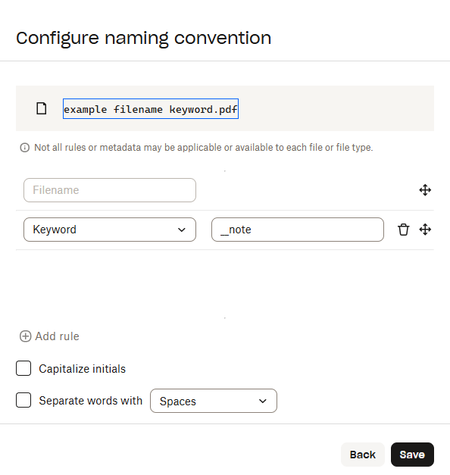
Device Online dropbox automation Question or Issue I have set up an automation that first renames and then moves files from a folders subfolder. The renaming is supposed to just add "_note" to the file name. The problem is that in addition to adding _note, it removes most of the file name and all my files get the name "ai_note" instead of the original "something. something_ai" Here is the automation: Here are the results in the other folder: Here is the file history showing that the start of the file name was removed and replaced by just the last word (AI).82Views0likes5Comments
bulk file rename in "automation option"
Hi, We have been working with a lot of image-sequence-based files recently. When it came to the point when we had to rename about 60.000 files at once, we faced the following problem: In Finder of MacOs (Tahoe) it is easy to bulk rename multiple files at once using the "search & replace" option. But when we do so, the sync process is started and it takes a lot of time until the files are synced online. As we are co-working on our projects, this procedure has become the bottleneck in our workflow. Then we tried to apply the automation option where there also is a renaming function. But unfortunately, it is only possible to add prefix or suffix. Wouldn't it be great to have there the function 2search & replace" to rename multiple files as required? This would be a great idea and function to implement. Thanks and best Juhn104Views0likes1Comment
Use dots instead of dashes with naming conventions
I use the "Scan Files" feature regularly and I would love to have control over the format of the name given to the new file. It is currently prefixed by the date in reverse (great), which I like, but I have ALWAYS delimeted using period whereas your default uses a mixture of hyphen, space and periods. I would hope, however, that a user could choose this format, including datetime attributes and delimeters - eg. YY.MM.DD.HH.MM.<filename>.<filetype> Would love to see this feature.73Views0likes1Comment
Dropbox API Integration - Quick File Automation
Hey Dropbox devs! Need some help building a sweet file management automation tool. What we're tackling: Custom API integration for automated file sync and backup workflows Bulk file organization scripts with metadata tagging and folder structuring Simple webhook setup for real-time file change notifications and processing Looking for: Dropbox API v2 experience with OAuth implementation knowledge Python or JavaScript skills for file management automation Understanding of cloud storage workflows and permission managementAny system, tool, or tip for bulk-creating structured folders efficiently?
Hi all, I’m currently trying to improve how I handle client onboarding, specifically, the folder structures we set up in Dropbox. Right now, I’ve been creating folders manually for each new client, with subfolders for contracts, reports, communications, etc. But as the volume increases, it’s becoming really time-consuming and prone to inconsistencies. I’m wondering if anyone has a system, tool, or tip for bulk-creating structured folders efficiently? Ideally something that works with Dropbox. I recently came across a tool called EZFolders that lets you generate folder structures using AI, either by typing a command or uploading a CSV. It also has an AI assistant that helps guide you if you’re not sure how to format things. Seems like it could help, but I’m curious if anyone here has used it or knows more about it before I dive in. Would love to hear what others are doing to save time with this kind of task!444Views1like3Comments
409 no_write_permission
Hi, I am using dropbox in n8n and have connected a dropbox team account. But I am getting 409 no_write_permission error. It was working fine a few days earlier but now I am getting this error for no reason. I changed nothing in n8n, nor in my dropbox settings. It was working fine a few days ago. It happened before too, and it got resolved after reconnecting and create a new node. But I am getting the same error again. Why am I getting this error and what is the fix. Please help me out! complete error: 409 - "{\"error_summary\": \"path/no_write_permission/.\", \"error\": {\".tag\": \"path\", \"reason\": {\".tag\": \"no_write_permission\"}, \"upload_session_id\": \"pid_upload_session:ABIJdIKguQwyyRnlJPP0VU6cKu7yvOT0Xo4yZCllqv3074TJtg\"}}"Solved443Views0likes5CommentsHow get notified if automation was successful/failed?
I have an Automated Folder that converts the uploaded file to PDF and saves it. I am using Dropbox API for it. Is there a way for me to programmatically check whether/when the PDF file generated by the automation is available? How should one go about it?133Views0likes1CommentStay organized and save time with new folder automation updates
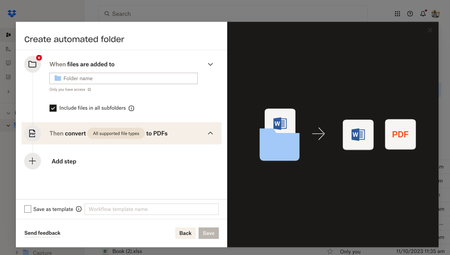
Hey Dropbox Community! We are so excited to introduce new enhancements to the folder automation features to help you stay organized. We’re introducing multiple step automations (up to five), including within subfolders. Now, you can configure multiple automations on selected folders and subfolders to automatically convert uploaded files to PDFs, rename files, add watermarks, and more. Get started by selecting “+Create” under the search bar, then select “Folder,” and finally select “Automated folder.” Tell us about your experience with Dropbox's Folder Automation Features in the comments below! Or comment down below any features you'd love to see to help you stay organized.13KViews2likes7Comments