We’re Still Here to Help (Even Over the Holidays!) - find out more here.
desktop
7361 Topics
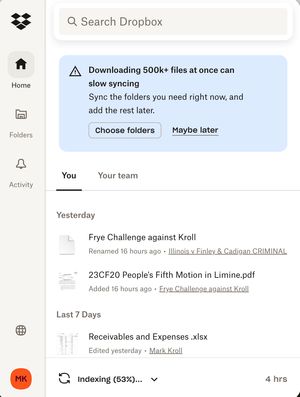
My Dropbox app keeps indexing files and I'm running out of hard drive space
I was running out of room on my MacBook Air (2 TB, Sonoma 14.7.8) and was told to make all Dropbox folders Online only to free up storage. It started indexing and freed up almost 1 TB so I was happy for a few minutes. Then it kept indexing and a few days later I was out of memory again. This has been going on for 6 weeks! ChaptGPT calls this a "rehydration" DropbBox Death loop. Chat said to mark the whole DropBox master folder as Online Only, then stop and restart DropbBox ap. Did not solve the problem. Possible clue: My main computer (MacBook Pro (4 TB, Sonoma 14.6.1) is doing fine except the Finder now shows that there is a 20 GB "Conflicted" copy of my DropBox files. Can anyone help me?71Views0likes4Comments
How to rename the Dropbox root folder?
There is a post about this from 2015 with replies up to 2019 but the reply button is greyed out, hence I'm creating a new thread. I'm guessing Dropbox couldn't be bothered to find a solution so instead, they just silence their customers. Interesting. Guess what, it's 2022 and users still need an option to rename their folder. I recently upgraded to dropbox business and it renamed my entire dropbox folder from 'Dropbox' to..... '[xyz] Dropbox'. Yup, you guessed it- all file links incl. professional software I rely upon broken, causing thousands of wasted hours. The solution? Rename the folder back to just 'Dropbox'. Do dropbox allow this simple rename? Apparently not. 7 years after that first thread with thousands of complaints from users, Dropbox still hasn't enabled a simple 'rename' functionality. My question here: "Has anybody found a way to rename the root dropbox folder?????"Solved3.1KViews0likes3Comments
Dragging file - copy vs. move
I use Dropbox to move files between Mac computers (OS 10.11 and 10.13) and Windows computers (Win7). When I drag a file from the Dropbox folder to a Windows local folder, it COPIES the file. When I drag a file from the Dropbox folder to a Mac local folder, it MOVES the file (i.e., deletes it from the Dropbox folder). Why the inconsistent treatment of the same action? Is there anything a user can do to change the default action? Obviously there is a way in each system to reverse the default action, but why make the user remember to do that? At this point I don't even care whether the default is MOVE or COPY -- I just want it to be the same on all platforms.Solved12KViews1like8Comments
Can't redirect into reparse point please choose different target path
So, I uninstalled Dropbox. Now I find that my folders; Desktop, Documents, Downloads, Music, Pictures, and God knows what else are all set to my Dropbox folder. When I go to 'restore' these folders to their correct, default Windows 10 path, I get the above error message. This is outrageous. What is the solution?Solved14KViews0likes67CommentsMoving the Dropbox Folder on Ubuntu
I have been looking but not finding anything... can anyone point me in the right direction for moving the Dropbox folder? I have Ubuntu Server (no Gui) installed and the Dropbox folder (and the two symlinks Dropbox Business created) is located in the home directory. My data is in another directory (seperate hard drive) called Shares. With the receint Dropbox update The symlink I created no longer work and I am dead in the water... Everything I do must be via Command Line...7.4KViews0likes26CommentsStop Dropbox from backing up external drive
I made the mistake of accepting a request from Dropbox to back up an external drive plugged into my Mac. I didn't stop to think the files in that drive were going to be huge video files that should NOT be backed up to Dropbox. How do I stop the backup of that external drive? The help section says go to the preferences of the Mac Dropbox app and uncheck folders I don't want to be synced. There is NO such option. The only option is to uncheck something about set up notifications for new external drives. There was another help suggestion that suggested right clicking "the backup" and pausing it. WHAT backup?? I don't see the external drive listed anywhere in my Dropbox folder, and right clicking the external drive icon on my desktop doesn't show any Dropbox options. How do I stop this backup without disabling ALL backups?? Thank you for any help on this....Solved18KViews5likes22CommentsChanging online only to local sync
A suggested solution for changing online only files to local cync was to "sync your files locally (on the top folder level)" . This is not very helpful, because the problem is how to sync files locally. So, how do you "sync your files locally (on the top folder level)" ??? I can't see the files in the desktop app and I can't change their sync mode in the web interface. Changing the top level dropbox icon to local sync in the desktop app does not affect the files that are online only. Something I'm missing here? /tiinaSolved6.6KViews0likes5Comments
Red circle with a white “X” in it on file in Dropbox folder
When I put a file in the Dropbox folder I get a red circle with a white “X” in it next to the file and the file does not transfer to the Dropbox folder on my other computers? This just started happening. I am paid up through the end of February.2.5KViews0likes1CommentTrying to upload very large files (300GB) via the desktop app.
uploading very large files I have tried to upload a 300GB file to dropbox (I have 1TB capacity) using the Mac desktop application and I am being informed that there isn't enough free space. I bought this extra memory as dropbox write:"Files uploaded to Dropbox via the desktop application or mobile apps have no file size limit". Am I doing something wrong?Solved47KViews0likes12CommentsMacOS: Not seeing Dropbox under the Locations section in Finder's left pane.
I have updated Dropbox on MacOS (12.6.5), and I have learned that I should know be able to see "Dropbox" in Finder on the left hand pane under 'Locations'. However there is no such entry; 'Locations' is empty. I *can* access Dropbox in the following way: In the MacOS menu bar, I click the Dropbox icon, and then click the icon which says "Open Dropbox Folder". Then a Finder window opens, showing my Dropbox files. I just wonder why I can't see them in just a normal new Finder window.Solved11KViews2likes40Comments