We’re Still Here to Help (Even Over the Holidays!) - find out more here.
error messages
2423 Topics
".dropbox" file shows "NSFileProviderErrorDomain error -2005" on Mac. Should I keep it?
I've read that I should keep the ".dropbox" file. It shows up on two of my mac computers with a sync error status of "The operation couldn't be completed. (NSFileProviderErrorDomain error -2005)". I'd like to understand what is going on here and what I can do to relieve my account of its errors. Any information is appreciated. For starters... - Is this file supposed to be synced? - I don't know how I would even remove it from being synced aside from deleting it. - Why don't I see it on dropbox.com? - Is it trying to sync? - Are file names like this acceptable? - What can I do to fix the error? specs: macOS 12.6.9 running Dropbox Basic v182.4.6427 using "updated" version for Apple’s updated File Provider API.Solved3.5KViews0likes4Comments
Extensionless files can’t be previewed
Yesterday, I decided to rename some of my videos on here to help me better identify them. After doing so now my files say: "Extensionless files can’t be previewed" . I tried to restore them to the previous version but still nothing. It will let me view the previous version but I cannot get a link to it to show others and when I try and download it (in hopes that I can upload it on here again) I get this error: Error (403) It seems you don't belong here! You should probably sign in. Check out our Help Center and forums for help, or head back to home. I am indeed signed in and it is my video and my account. I would really love to fix this issue because these videos (which are from my security cameras) are actually quite important. I needed to show them to a lawyer etc. I also tried to search my computer and see if it is in the dropbox cache, but that is empty. Unfortunately when I had transferred these files to another hard drive something happened and some of the files did not transfer. So, I don't have that option to go back and get them that way. Again, all I did yesterday was rename the files. I also tried restoring the previous versions with no luck. Any clue as to what happened and how I can fix this?Solved23KViews0likes14Comments
Err_connection_refused error on multiple web browsers
Can’t seem to connect to Dropbox at all using multiple different browsers and in private /incognito mode. Keeps saying refuses to connect. Have added Dropbox.com to trusted sites in settings, uninstalled and reinstalled the Dropbox program and browsers. Have also made sure no proxy settings are active along with making sure the program is allowed access. NOTHING WORKS!!!Solved35KViews1like65Comments
Cannot open Word documents in Dropbox
I am synced to open Dropbox documents in the online-only mode on my Surface Pro since it doesnt have a ton of hard drive memory. That has worked well for several years. Recently, my Surface Pro has been unable to open Word documents stored stored in Dropbox. Instead, I get the "Unspecified Error" message. I can open pdf files stored in Dropbox without a problem. What changed? How do I resolve this? I have updated my Windows and Dropbox apps. Thanks.Solved12KViews2likes7Comments
Server or network failed or the format is not supported error when viewing a video
I have been trying to view a video that was uploaded here but I keep getting the error message "The media could not be loaded, either because the server or network failed or because the format is not supported." I then tried to download the video (using chrome) and it failed, saying that there was a server problem. I have tried changing my DNS settings, refreshing the page, checking to see if my browser is up to date, changed browsers, downloaded Quicktime player and VLC to try and view the video (it was captured on an iphone and is apparently an mp4 file), and even tried to disable adblock and got nothing. I'm tired of this and I just want to watch the video... What else can I do? Here is a link to the video https://www.dropbox.com/s/nru5e6j1ar2i5a9/VID_20220917_160014.mp4?dl=0Solved4.9KViews0likes6Comments
Dropbox App unexpectedly quit on Windows 10
I get an error when I try to open the Dropbox app saying "Dropbox unexpectedly quit. Your files are safe. Restart Dropbox..." It started about two weeks ago (and around the same time as two other unsolved posts on the forum). Two days ago I formatted my computer and reinstalled programs. This morning I opened the computer and saw the same error. Running Windows 10. Does anyone have any suggestions?Solved15KViews1like41CommentsProblems when using IDM to download a big single file on Dropbox
Dropbox has major serious problem with download manager especially IDM. The problems that I faced when downloading a large file (let's say around >3GB) are listed below :- 1) It will download only with one connection, not the usual 8-16 connections like from other sites. 2) The download speed is capped to 30Mbps while I have 100Mbps connection 3) The download will fail after reaching specific point due to timeout error and cannot be resumed. 4) Getting 403:Forbidden/409:Conflict errors when try to resume with refreshed link. This needs to be sorted out as soon as possible.5.2KViews0likes6Comments
"This billing country change isn't supported" error when changing my billing information
I receive an error saying "This billing country change isn't supported" when I try to change my credit card for billing as my old one expired. My old card was an Australian card and the new one is a US one. When I choose United States from the dropdown list I receive that error message.Solved16KViews1like27Comments
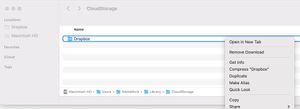
Deleting Dropbox from CloudStorage Location (M1 Beta)
After upgrading to new Beta to dropbox for M1, syncing stopped working and finder window start freezing while searching dropbox files. So I decided to delete Dropbox, but cannot delete this Folder (/Users/Username/Library/CloudStorage/Dropbox/) that got created with new Dropbox Beta version, after Unistalling the Dropbox app.6.3KViews0likes6Comments