Your workflow is unique 👨💻 - tell us how you use Dropbox here.
Quota
291 Topics
Deleted everything, still over quota.
I downgraded to Dropbox Basic since I haven't been using Dropbox at all lately. I've deleted everything from my Dropbox, but I'm still showing as exceeding my limit. I've looked everywhere in my account using the web portal just to make sure I can find any and everything, and there's nothing remaining in my account (I downloaded everything prior to deleting). I even looked in the Dropbox folder on my Mac, and it's showing 0 items. When I go into my account through the web, it shows 6.1 GB of "Backup" but when I go to the DropboxBackup, there are no backups there.Solved28Views0likes3Comments
Rechercher et trier fichiers par taille dans l'ensemble d'une dropbox ?
Afin de libérer de l'espace sur notre espace dropbox en ligne, bientôt saturé, j'aimerais faire une recherche de fichiers dans l'ensemble des dossiers et sous dossiers dropbox, en indiquant un critère de taille, comme c'est possible de rechercher des fichiers sur un disque dur, par taille, sous Mac OS et Windows, afin de supprimer les fichiers inutiles.Est-ce possible de le faire sur dropbox.com ? Une recherche dans le dossier dropbox de mon disque dur ne m'apporterait que des résultats partiels, car précisément nous stockons les fichiers les plus volumineux et anciens en ligne, plutôt qu'en local.30Views0likes3Comments
I deleted thousands of pictures but my account is still over quota
Hello, I understand that I'm over the storage limit, but I deleted thousands of pictures recently. Can you check for me how much space was freed up from that? It should've gone down, I don't know why it's so high still. What takes up so much space for it to be that high? Also, will it really delete my files if I'm still over the limit by March 18th? I never got a warning like that before. I'm confused because ever since I deleted a bunch of photos, it keeps giving me that message that my files will be deleted, and back when I had even more storage used before deleting the pictures, I never got that message.65Views0likes2CommentsI removed all my files but my account still appears to be full
I am using the student plan, which provides 2GB of storage for my use. I only have a few MB used if anything. I transferred over my folder into a hard drive to remove all files inside it, and it still says I am capped out even though my account shows I have no files of anysort inside (photos, all files, shared). I have tried deleting the ".dropbox.cache." folder, and it keeps coming back after every startup of Dropbox. I need more storage to be able to be productive in class cause right now I can not even accept files that are crucial for me to even start the semester. If there is anything that I missed or information that can help, please tell me.52Views0likes3CommentsIt's impossible to get Support. I need help with my account's storage.
So, after you bombard a User with scary sounding emails about how they're over their max allowed storage & you're going to close their account (but they open their Dropbox & only see your 2 introductory Welcome to Dropbox files in it, so how can they possibly be over the allowed storage limit?) - and they then make it through ALL the roadblocks you put up in order to keep us from actually reaching a Human for Help - and they finally get a response from "Tommy" in Dropbox Support who tells them "Thanks for reaching out to Dropbox support. My name is Tommy, and I'm a member of the Dropbox Support team. Your support options depend on what kind of account you have. To see the support options for your account, sign in and go to https://dropbox.com/support. Your query today can be supported by our help center, chatbot, or our community; this ticket will be closed now." - STOP DOING THAT. THAT IS NOT SUPPORT OF ANY KIND. Stop making it so impossible to actually GET SUPPORT. That's my idea. Thanks :)51Views0likes3CommentsDropbox says my folder is full when it's not
My drop box keeps telling me my folder is full and i have no more space. It says that ive used 5 GB out of 2.2 GB and need to upgrade my plan. I've already deleted all files in my folder, including deleted files and shared folders but I still get the samme "error".Solved75Views0likes9Comments
Dropbox is telling me I'm using ~6GB of storage when I have much less.
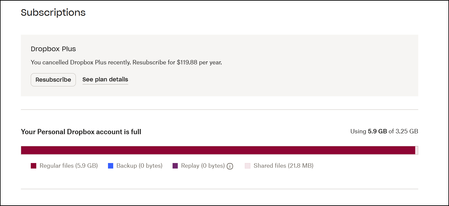
Hi there, I've recently switched to the free version of Dropbox after being a member for many, many years, because the new features that allow opening and commenting in documents within Dropbox wasn't easy to turn off globally and doesn't work for my work processes. I've deleted almost all my files, have never used backup, and left almost all shared drives. I've also permanently deleted already deleted files. Dropbox continues to tell me that I'm using so much more storage than it seems that I am. Does somebody have guidance on where that is coming from? Here are screenshots: It's telling me most of this space is used by 'Regular files': Here are my folders & files (and the space it says they take): As I mentioned, I also did the 'permanent delete' of my deleted files. Is there a significant delay to that being taken into account? Any thoughts welcome...Solved121Views0likes3Comments