Your workflow is unique 👨💻 - tell us how you use Dropbox here.
Forum Discussion

lucasromeiro
7 years agoExplorer | Level 3
Access and file upload using command line (RAW socket)
Hello everyone. I am trying to login and upar a file in the dropbox using command line, (RAW socket). I am having difficulty understanding how to do it, because I always get error from my commands....
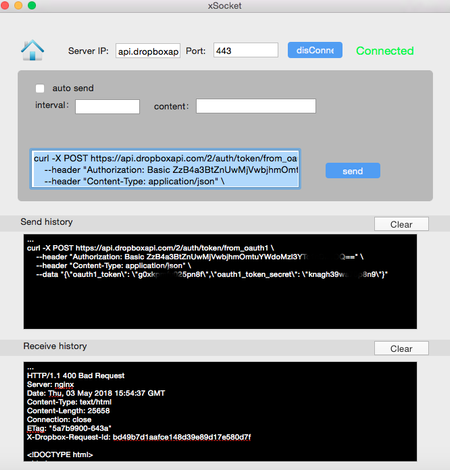

lucasromeiro
7 years agoExplorer | Level 3
Hello chirstius
Thanks for helping me!
I think you understood what I need.
I'm still saying.
I'm going through parts ...
First I tried to make the GET using the pattern I passed above.
But it still does not work ...
When I use the terminal / command line to send the GET, I have no response ...
Look below the commands I sent:
Server: www.dropbox.com
Door: 443 or 80
1:
GET /oauth2/authorize?response_type=code&client_id=g0xkpmfu025XXXX/ HTTP/1.1
Host: dropbox.com
2:
GET /oauth2/authorize?response_type=code&client_id=g0xkpmfu025XXXX/ HTTP/1.1
Host: dropbox.com
User-Agent: Mozilla/5.0 (Windows; U; Windows NT 6.1; en-US; rv:1.9.1.5) Gecko/20091102 Firefox/3.5.5 (.NET CLR 3.5.30729)
Accept: application/octet-stream
Accept-Language: en-us,en;q=0.5
Accept-Encoding: gzip,deflate
Accept-Charset: ISO-8859-1,utf-8;q=0.7,*;q=0.7
Keep-Alive: 300
Connection: keep-alive
Pragma: no-cache
Cache-Control: no-cache
Test these 2 formats, in both I got no other server response, neither error, nor success ...
What could it be?
I did not succeed in anything, because I could not do it ...
Thank you very much for your help !!

chirstius Dropbox Staff
7 years agoDropbox Staff
That GET request needs to be made from a browser. You can script launching the system browser on your device and pointing it to the generated URL which will make a simple GET request by default. I should have been more clear on that in my previous response.
Have you tried just pasting your URL into a browser to see if it's working at all? I'd start there to make sure it's well-formed and that Dropbox responds with a proper authentication window. Then you can look at how to script launching the browser to open that URL.
-Chuck
- lucasromeiro7 years agoExplorer | Level 3
Hello! It worked!
I pasted the URL into the browser and it returned an authentication window!
Thank you for explaining better.
But in my case, I need to do everything by terminal / command line.
Because my solution will be all in command line (raw socket). how can I do this command line authentication?
it's possible?
Every time I use the system, will I need to do this or is it only once?
Thanks a lot for the help!
- chirstius7 years ago
Once you have the token it's good until it is revoked. If you are only planning on doing this for a single user/account (you) you can probably use a generated token from your developer console (which is just a shortcut to link the app to your Dropbox directly) and avoid the OAuth 2 flow entirely. If you need this to run against multiple accounts you'll want to find a workable solution for the OAuth 2 flow and make sure you have a secure mechanism in place for storing API tokens.
-Chuck
- lucasromeiro7 years agoExplorer | Level 3
Nice, i got it.
So I have 2 options:
- Use Token from my developer account
- Use OAuth2 and store Tokens on my device.
I want to learn how to do both ways.
Because I'll need the 2.
I have a secure location to store the tokens to use OAuth 2.
But I do not know how to authenticate the uduário through OAuth 2 through raw socket.
I need to know what to send to authenticate the user using the 2 options (Token and OAuth 2)
Can you help me? I do not know what commands I have to send for this, I believe a GET or POST. But I do not know the structure.
I need help.
About Dropbox API Support and Feedback

Get help with the Dropbox API from fellow developers and experts.
The Dropbox Community team is active from Monday to Friday. We try to respond to you as soon as we can, usually within 2 hours.
If you need more help you can view your support options (expected response time for an email or ticket is 24 hours), or contact us on X, Facebook or Instagram.
For more info on available support options for your Dropbox plan, see this article.
If you found the answer to your question in this Community thread, please 'like' the post to say thanks and to let us know it was useful!


