Your workflow is unique 👨💻 - tell us how you use Dropbox here.
Forum Discussion

lucasromeiro
7 years agoExplorer | Level 3
Access and file upload using command line (RAW socket)
Hello everyone. I am trying to login and upar a file in the dropbox using command line, (RAW socket). I am having difficulty understanding how to do it, because I always get error from my commands....
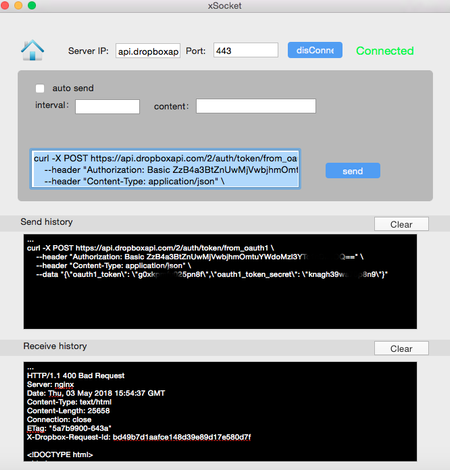

lucasromeiro
7 years agoExplorer | Level 3
chirstius
if I can do everything from the command line / terminal, I can put it in my project! I want to make a repository for arduino that makes sending and manipulating files in the dropbox. So I need examples and understand how to log in and upload a file. so I adapt the upload command to the other manipulation functions ... that is why the user can not access the browser. I am learning from your help. Now I only need to learn how to log in the 2 ways and upload a file. as I said above. can you help me? Sorry to bother you guys. I want to make this library to help other people who want to use Dropbox in their projects but have no Arduino API.
if I can do everything from the command line / terminal, I can put it in my project! I want to make a repository for arduino that makes sending and manipulating files in the dropbox. So I need examples and understand how to log in and upload a file. so I adapt the upload command to the other manipulation functions ... that is why the user can not access the browser. I am learning from your help. Now I only need to learn how to log in the 2 ways and upload a file. as I said above. can you help me? Sorry to bother you guys. I want to make this library to help other people who want to use Dropbox in their projects but have no Arduino API.

chirstius Dropbox Staff
7 years agoDropbox Staff
I'm not sure there's an easy way around authenticating through the browser, that's really how the OAuth2 workflow needs to run for us. What you might be able to do is generate the authorization link, write it to the console/terminal and ask your user to copy it into a browser on another device. Then prompt for the code that comes back. They can enter the code into the terminal, and you can complete authorization from there and store their token. Since this is a one-time action it might be an acceptable workaround.
As to your other question(s) around uploading, there is the singular /upload endpoint for files of 150MB or smaller:
https://www.dropbox.com/developers/documentation/http/documentation#files-upload
And there are chunked session endpoints for files larger than 150MB:
https://www.dropbox.com/developers/documentation/http/documentation#files-upload_session-start
https://www.dropbox.com/developers/documentation/http/documentation#files-upload_session-append_v2
https://www.dropbox.com/developers/documentation/http/documentation#files-upload_session-finish
If you are committing a large number of concurrent uploads.
The singular upload endpoint example in the documentation is self-contained. If you are using curl it should work as-is to upload smaller files.
For chunked uploads, you would need to determine what mechanism is available to you to chunk the files and provide that data to the endpoints (/start and /append_v2). That mechanism is a bit outside the scope of Dropbox API support though and is highly dependant on the platform and libraries available to you which I can't help with.
I do hope this gets you a bit closer to a solution,
-Chuck
- lucasromeiro7 years agoExplorer | Level 3
Cool, I get it.
I liked your idea of generating a link and the user copy it in the browser and enter the code in the program!
But I have some questions about that.
I think you can help me in them:
Earlier you told me that I have 2 options:
- Use My Account Token
- Use OAuth2 and store Tokens on my device.
Right?
How do I use the Token of my application to authenticate? Do I get a get in some specific format and receive some confirmation?
In the second case, I would use OAuth2 to store the tokens, but for that I would need the link for the user to paste into the browser as you suggested in the previous message. right? But, how can I generate a link if I do not have the user's key (client_ID) app?
As for uploading files, my system will always work with small files, it will never exceed 150Mb and I will always transfer one file at a time!
I think I'll use this:
https://www.dropbox.com/developers/documentation/http/documentation#files-upload
But I have not yet arrived in this part, first I need to be able to authenticate before I can upload ...
As I said earlier, I want to make a library for arduino. This will make things easier for other people. I'll also use it for my masters degree.
You have helped me a lot and I want to put your name in thanks, can I post?
Thanks, I think we can do this! :grinning: - lucasromeiro7 years agoExplorer | Level 3
Greg-DB
I made some progress.
I learned that through a request the dropbox already returns the token and other information !!
example:
https://www.dropbox.com/oauth2/authorize?response_type=token&client_id=g0xkpmfuXXXXX&redirect_uri=https://localhost
Returns:
https: // localhost / # access_token = NI7PL_K93wcAAAAAAAAcseCfBxabh2Pb1Zw-5IjC0Vd1lDEKKr1cWyIXXXXXXX & token_type = bearer & uid = 5043908 & account_id = dbid% 3AAAB-FHGsciRVJdVo4D4apeASBLPFXXXXXX
Informing only the client_id.
I read in the documentation that with this information I can already access my dropbox. But in the command line whenever I make a request nothing returns me ....
for example, I tried to make this request for user information:
curl -X POST "https://api.dropboxapi.com/2/users/get_current_account"
--header "Authorization: Bearer NI7PL_K93wcAAAAAAAAcseCfBxabh2Pb1Zw-5IjC0Vd1lDEKKr1cWyIjOXXXXX"
But nothing returns ... I do not understand why ...
I connected to:
server: api.dropboxapi.com
port: 443 - Greg-DB7 years ago
Dropbox Community Moderator
[Cross-linking for reference: https://stackoverflow.com/questions/50185625/upload-file-to-dropbox-by-terminal-command-line#50185625 ]
lucasromeiro I see that you also posted on six other old/unrelated threads about this. We're happy to have you on the forum to engage with us an other developers, but please refrain from spamming duplicate comments like this. I've removed your other comments on those threads, and we'll continue to help you here.
Anyway, I don't see anything obviously wrong with your latest get_current_account code. I recommend adding the --verbose flag to curl so you can get more output.
- lucasromeiro7 years agoExplorer | Level 3
Olá!!
Eu enviei os comentarios em topicos que eram relacionados. Percebi que algumas pessoas estavam com alguma semelhanca com minha duvida. Pedi ajuda para elas... Não sabia que isso era errado. Me desculpe.
Pois e, o comando está certo! Eu não entendo porque em lugar nenhum consigo fazer ele funcionar, ja tentei usar varios programas, ja tentei sites etc... Mas não funciona...
Olha a resposta acima, eu explico mais.
Será que estou tentando conectar no endereco errado? algum argunto errado ou faltando??
Sobre o --verbose. como posso inserir?
Todos os codigos que testo retornam o mesmo erro...
Tenta por eles em: https://onlinecurl.com/
Ou tenta enviar via socket...
Sempre recebo algo como:
HTTP/1.1 400 Bad Request
Server: nginx
Date: Tue, 08 May 2018 21:27:40 GMT
Content-Type: text/html
Content-Length: 25658
Connection: close
ETag: "5a7b9900-643a"
X-Dropbox-Request-Id: 71492938f986f1cc2fdcab1000320cc8
<!DOCTYPE html>
<html>
<head><meta http-equiv="Content-Type" content="text/html; charset=utf-8">
<title>Dropbox - 4xx</title>
<link href="https://cfl.dropboxstatic.com/static/css/error.css" rel="stylesheet" type="text/css"/>
<link rel="shortcut icon" href="https://cfl.dropboxstatic.com/static/images/favicon.ico"/> - chirstius7 years ago
If you are sending this over a raw socket then the curl commands won't work directly, they will show you what you need to send, but if you're truly at the level of raw sockets you need to implement the HTTP protocol yourself directly. Sending the literal curl command text down the socket to the Dropbox API server will not work. Explaining how to implement HTTP over a socket is outside the scope of support we can provide on this forum so I will not be able to help you there.
Perhaps you can find a simple/lightweight HTTP library for arduino that you can install, or that is present by default, to make this easier. But if not, I do know there are several samples available by searching for "arduino http post"
-Chuck

About Dropbox API Support and Feedback

Get help with the Dropbox API from fellow developers and experts.
The Dropbox Community team is active from Monday to Friday. We try to respond to you as soon as we can, usually within 2 hours.
If you need more help you can view your support options (expected response time for an email or ticket is 24 hours), or contact us on X, Facebook or Instagram.
For more info on available support options for your Dropbox plan, see this article.
If you found the answer to your question in this Community thread, please 'like' the post to say thanks and to let us know it was useful!


