Your workflow is unique 👨💻 - tell us how you use Dropbox here.
Forum Discussion

lucasromeiro
7 years agoExplorer | Level 3
Access and file upload using command line (RAW socket)
Hello everyone. I am trying to login and upar a file in the dropbox using command line, (RAW socket). I am having difficulty understanding how to do it, because I always get error from my commands....

lucasromeiro
7 years agoExplorer | Level 3
chirstius
if I can do everything from the command line / terminal, I can put it in my project! I want to make a repository for arduino that makes sending and manipulating files in the dropbox. So I need examples and understand how to log in and upload a file. so I adapt the upload command to the other manipulation functions ... that is why the user can not access the browser. I am learning from your help. Now I only need to learn how to log in the 2 ways and upload a file. as I said above. can you help me? Sorry to bother you guys. I want to make this library to help other people who want to use Dropbox in their projects but have no Arduino API.
if I can do everything from the command line / terminal, I can put it in my project! I want to make a repository for arduino that makes sending and manipulating files in the dropbox. So I need examples and understand how to log in and upload a file. so I adapt the upload command to the other manipulation functions ... that is why the user can not access the browser. I am learning from your help. Now I only need to learn how to log in the 2 ways and upload a file. as I said above. can you help me? Sorry to bother you guys. I want to make this library to help other people who want to use Dropbox in their projects but have no Arduino API.

chirstius Dropbox Staff
7 years agoDropbox Staff
The "token from developer account" method is just using the token you can generate for yourself from the developer console.
Go to: https://www.dropbox.com/developers/apps
Login, if required, select your app. Scroll to the OAuth 2 section and under 'Generated Access Token', click generate:
This will link your app to your account and give you back an API access token, you can use that token to test your curl commands for the API endpoints. This method of authentication is there to make it easier for you to test against your own account quickly.
To enable other users to add your app to their Dropbox, you need to take them through the OAuth flow we discussed, and you tested earlier in this conversation. Where you would have them paste the authorization URL string into a browser and then enter the code generated back into the console.
You use that code to make a call to https://api.dropboxapi.com/oauth2/token which is documented under the 'Authorization' section of the HTTP endpoints documentation found here: https://www.dropbox.com/developers/documentation/http/documentation
A sample curl POST to this endpoint might look like this:
curl -X POST https://api.dropboxapi.com/oauth2/token \
    --data "code=<code from user>&grant_type=authorization_code&client_id=<your app key>&client_secret=<your app secret>"
This should return a valid API access token you can use to access that users account.
Once you have that token and you want to upload content, refer to:
https://www.dropbox.com/developers/documentation/http/documentation#files-upload
Since you said the files will be small (<150MB) that endpoint should be all you need, there is a curl example right in the documentation that you can edit to fit your needs (focus on the Dropbox-API-Arg header information)
All other file operations have similar curl-based examples in the documentation which should point you in the right direction once you have your access tokens sorted out.
I hope this gets you moving towards a working solution.
-Chuck
- lucasromeiro7 years agoExplorer | Level 3
Cool! So I'm on the right track!
I have already done this and I have my token.
I understood now that this was to facilitate.
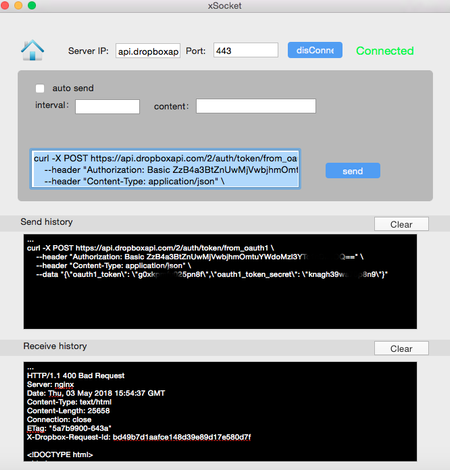
What I do not understand is that I put my token in the commands and send ... anyway they do not work!
Look:What I do not understand !!
The commands are not working, none worked so far ...
I already tried with my token that I took as you described above and replaced in the command and also I was already in the documentation and I clicked to him to fill alone the token in the command. It gets filled, I send the command, but it also does not work.
I think there is something wrong with the commands, maybe something is missing that is not in the documentation ...
For example, I tried this command that is simple and only returns space, but does not work:curl -X POST https://api.dropboxapi.com/2/users/get_space_usage \ --header "Authorization: Bearer NI7PL_K93wcAAAAAAAAcu3AuVqxJiD6CjL0njHjUsM3EwczSjjeKJIny-lxxxxxxx"
The command that sent me above I could not test, because I did not understand how to fill in the "code = <code from user>". I tried to put the tokens on but they did not work.
I looked at the documentation and the link you sent me to upload ... but I can not send any commands yet to be able to explore other things ...
Any command I send, always returns the same error:I also tried to send the commands through this site. Did not work.
I suspect something is missing from the command or is incomplete in the documentation. Friends also failed to send via socket ...I think I'm missing something simple.
About Dropbox API Support and Feedback

Get help with the Dropbox API from fellow developers and experts.
The Dropbox Community team is active from Monday to Friday. We try to respond to you as soon as we can, usually within 2 hours.
If you need more help you can view your support options (expected response time for an email or ticket is 24 hours), or contact us on X, Facebook or Instagram.
For more info on available support options for your Dropbox plan, see this article.
If you found the answer to your question in this Community thread, please 'like' the post to say thanks and to let us know it was useful!


