We're making some changes to the Dropbox Community 👩💻 - Find out more here.
Forum Discussion

Bobby19
9 months agoExplorer | Level 4
Best practice to convert Dropbox shared URL to direct download link in code?
- 9 months ago
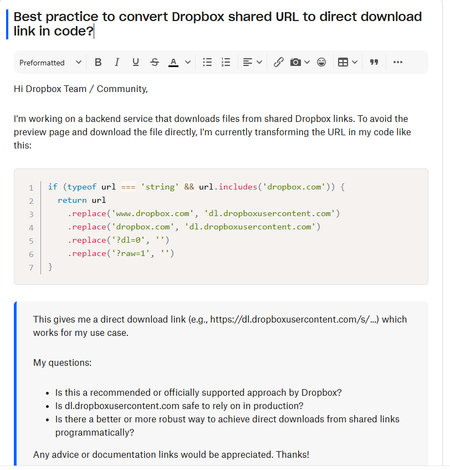
The dl=1 parameter is meant for downloading a file in a browser, so if you want to programmatically retrieve the file data, you may want to use raw=1 instead of dl=1. I just tried it and raw=1 returned a 'content-type: image/png' (after the redirect), for example.


Bobby19
9 months agoExplorer | Level 4
I have refer the doc, but in my case i want to extract the Content-type of a image from a link and i have tried in postman whenever i am changing hostname it is giving me that content-type properly, but keeping the hostname same and changing the query parameter to dl=1 it is giving application/binary
So what to do for getting correct content-type
const getMedia = (options) =>
  new Promise((resolve, reject) => {
    request.get(options, (err, response) => {
      if (err) {
        reject(err)
      }
      resolve(response)
    })
  })
I am doing this to get the Media and then extracting its mime type, sometimes its working and sometimes not, but by changing hostname its working fine, so i want the concrete reason or a any other solution which will be feasible for future also
- Greg-DB9 months ago
Dropbox Community Moderator
The dl=1 parameter is meant for downloading a file in a browser, so if you want to programmatically retrieve the file data, you may want to use raw=1 instead of dl=1. I just tried it and raw=1 returned a 'content-type: image/png' (after the redirect), for example.
About Dropbox API Support and Feedback

Get help with the Dropbox API from fellow developers and experts.
The Dropbox Community team is active from Monday to Friday. We try to respond to you as soon as we can, usually within 2 hours.
If you need more help you can view your support options (expected response time for an email or ticket is 24 hours), or contact us on X, Facebook or Instagram.
For more info on available support options for your Dropbox plan, see this article.
If you found the answer to your question in this Community thread, please 'like' the post to say thanks and to let us know it was useful!


