Your workflow is unique 👨💻 - tell us how you use Dropbox here.
Forum Discussion

Lodgical
5 years agoExplorer | Level 3
Create a Folder in a Team's Shared WorkSpace
Hi, please can you help.
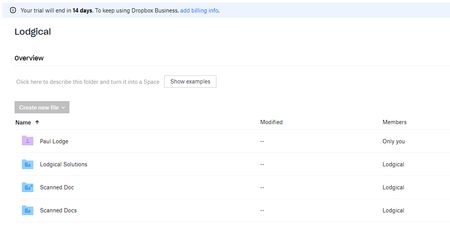
I am using the following post to try to create a folder inside the "Scanned Docs" Folder shown below
URL = https://api.dropboxapi.com/2/files...

Greg-DB Dropbox Community Moderator
5 years agoDropbox Community ModeratorIt sounds like you have the right idea here, but note that the 1-7 numbers in the guide you're referring to are just examples; you shouldn't actually be using those real calls.
Using the ID of the "Shared Workspace" as you mentioned (apparently starting with "84..." in your case) as the "root" in the "Dropbox-API-Path-Root" header is the right way to write in the team space though. And you would put the "Scanned Docs" path component in 'path' variable, along with the name of the new folder you want to create.
So, to summarize, your call should look like this:
curl -X "POST" https://api.dropboxapi.com/2/files/create_folder_v2 \
    --header "Authorization: Bearer <ACCESS_TOKEN>" \
    --header "Dropbox-API-Select-Admin: dbmid:..." \
    --header 'Dropbox-API-Path-Root: {".tag": "root", "root": "84..."}' \
    --header "Content-Type: application/json" \
    --data "{\"path\": \"/Scanned Docs/NEW_FOLDER_NAME\",\"autorename\": false}"
It sounds like you've already tried that though, and still got an error, or created the folder in the team member folder instead. I recommend double checking that you've copied the right ID though, as the IDs for different areas in the same account can look similar, e.g., may both start with "84..." in your case.
If this still isn't working for you, we'll be happy to take a closer like, but we'd need to see the actual values you're sending. In that case, please open a ticket with the code you're using, including the actual values (but please redact your access token) so we can check on that for you.
 Lodgical5 years agoExplorer | Level 3
Thank you Greg,
I have tried again using the exact Post you suggested. I had already tried that Post but gave it another go.
I checked the "84" id and - assuming I am collecting it in the correct way - I had definately copied the number across correctly (i.e. no typo's). I double checked the dbmid too.
I have opened a ticket per your suggestion.
About Dropbox API Support and Feedback

Get help with the Dropbox API from fellow developers and experts.
The Dropbox Community team is active from Monday to Friday. We try to respond to you as soon as we can, usually within 2 hours.
If you need more help you can view your support options (expected response time for an email or ticket is 24 hours), or contact us on X, Facebook or Instagram.
For more info on available support options for your Dropbox plan, see this article.
If you found the answer to your question in this Community thread, please 'like' the post to say thanks and to let us know it was useful!


