Your workflow is unique 👨💻 - tell us how you use Dropbox here.
Forum Discussion

Chillhop
6 years agoExplorer | Level 3
Create a get_temporary_link for a folder in a team account
Hi,
Im trying to create a public link from the API, the account where the folder is lodged is a Business account, when I try to share the folder I get "permission denied" error.
The main idea is...

- 6 years ago
Are you sure you have both the right path, as well as the right namespace (in the "Dropbox-Api-Path-Root" header)? I can't see the full values from your screenshot.
If you'd like us to check on this specifically for you, please feel free to open an API ticket with the full code (use the "Show Code" button), but please redact the access token.

Greg-DB Dropbox Community Moderator
6 years agoDropbox Community ModeratorIt looks like there are a few different pieces of functionality here that you may be referring to, so first, to clarify:
- You mention the 'get_temporary_link' endpoint in your post title. That refers to the /2/files/get_temporary_link endpoint. That can only be used to get temporary direct links to individual files, but it sounds like you want to get a link to a folder, so that wouldn't work for your use case.
- Your screenshot appears to show an attempt to use the /2/sharing/share_folder endpoint. That's a way to share a folder with other Dropbox users directly, not via a link. It sounds like you want a link, so that wouldn't be the correct endpoint to use.
- If you want to get a shared link to a folder, you should use the the /2/sharing/create_shared_link_with_settings endpoint.
Regardless of what sharing method you use, you will be subject to whatever access and sharing controls have been set for your team (such as the ones mentioned here).
Based on your description, try using /2/sharing/create_shared_link_with_settings. If that isn't working as expected, let us know.
- Chillhop6 years agoExplorer | Level 3
Hi, thank you for the update. But I tried the /2/sharing/create_shared_link_with_settings endpoint and it only gives the error "path/not_found/" I tried with several files and folders. I know the paths are correct since I use the same paths for other API calls.
(image link is broken, can not be displayed)
Maybe this is a bug on your end?
- Greg-DB6 years ago
Are you sure you have both the right path, as well as the right namespace (in the "Dropbox-Api-Path-Root" header)? I can't see the full values from your screenshot.
If you'd like us to check on this specifically for you, please feel free to open an API ticket with the full code (use the "Show Code" button), but please redact the access token.
- Chillhop6 years agoExplorer | Level 3
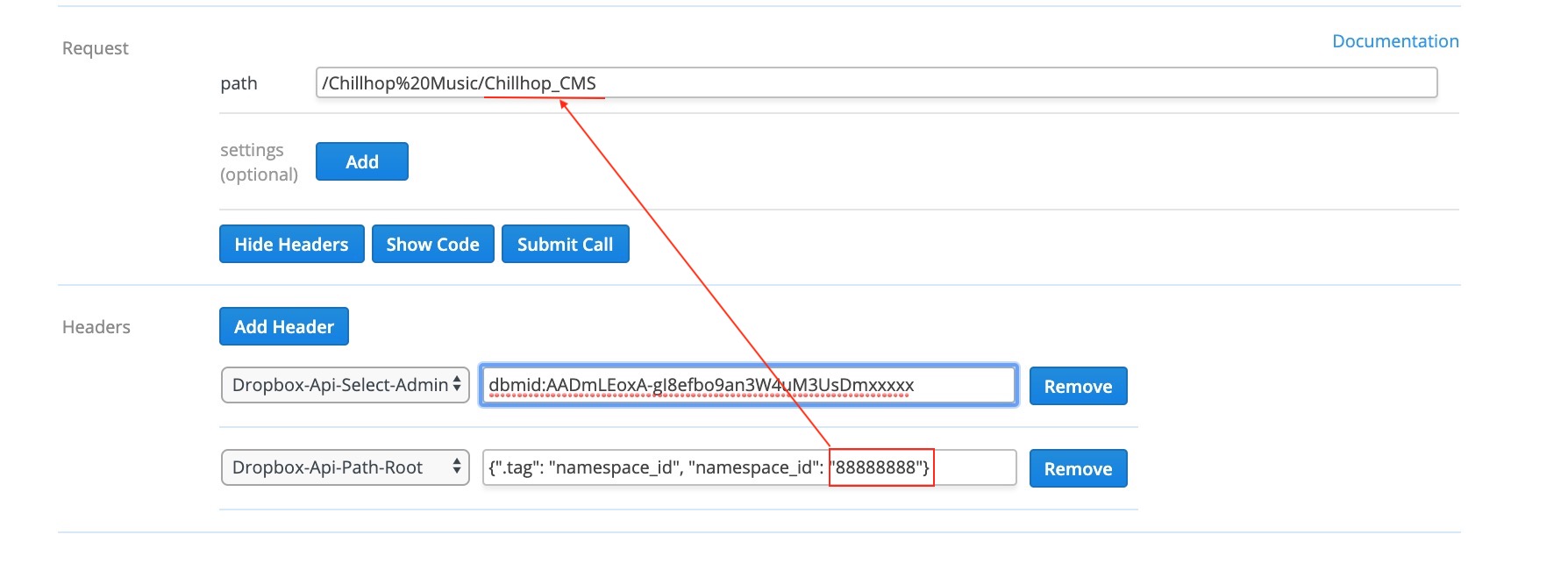
Hi Greg thanks for the reply. You were right in pointing out the Dropbox-Api-Path-Root, as it is only specified for 1 folder in the root of the team folders.
This was the error, i had to run my tests inside that folder. I added a screenshot in case someone runs into the same error.
thank you
About Dropbox API Support and Feedback

Get help with the Dropbox API from fellow developers and experts.
The Dropbox Community team is active from Monday to Friday. We try to respond to you as soon as we can, usually within 2 hours.
If you need more help you can view your support options (expected response time for an email or ticket is 24 hours), or contact us on X, Facebook or Instagram.
For more info on available support options for your Dropbox plan, see this article.
If you found the answer to your question in this Community thread, please 'like' the post to say thanks and to let us know it was useful!


