Our Community is in read-only mode until April 8th, learn more here. You can still search existing threads or get help via Dropbox Support, the Dropbox Help Center, or Learn.
Forum Discussion

arpit2011
5 years agoExplorer | Level 4
Error 400 with Download API
Hello Experts,
I have a business requirement in which files could directly be uploaded from dropbox through my javascript based web application(SAPUI5). My application is SAP UI5 based web appl...
- 5 years ago
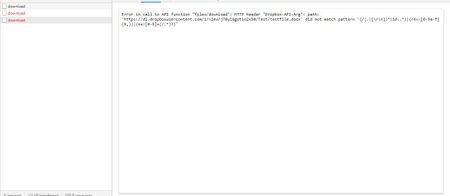
arpit2011 I see that Здравко has already helpfully answered your questions. To confirm, a shared link is not a path, which is why you got that first error. A path would look like "/folder/file.ext".
You can use the ID instead as you attempted, but the /2/files/download endpoint will return that 'path/not_found' error if the app doesn't have access to the identified file. For example, the access token may be for a different account, as Здравко said, or if the app is registered for the "app folder" access type, the app won't have access to the file if it exists outside its app folder.
As for "How to get the access code in runtime through JS", getting an access token does initially require some manual user interaction, but you can store and re-use it after that. I recommend reading the OAuth Guide and authorization documentation for information on how that all works.
By the way, you should never share your access token, as you did here in your images. I've redacted them for you, but for the sake of security, you should disable that access token since it was posted publicly. You can do so by revoking access to the app entirely, if the access token is for your account, here. Or, you can disable just this access token using the API.

arpit2011
5 years agoExplorer | Level 4
Greg-DB wrote:arpit2011 I see that Здравко has already helpfully answered your questions. To confirm, a shared link is not a path, which is why you got that first error. A path would look like "/folder/file.ext".
You can use the ID instead as you attempted, but the /2/files/download endpoint will return that 'path/not_found' error if the app doesn't have access to the identified file. For example, the access token may be for a different account, as Здравко said, or if the app is registered for the "app folder" access type, the app won't have access to the file if it exists outside its app folder.
As for "How to get the access code in runtime through JS", getting an access token does initially require some manual user interaction, but you can store and re-use it after that. I recommend reading the OAuth Guide and authorization documentation for information on how that all works.
By the way, you should never share your access token, as you did here in your images. I've redacted them for you, but for the sake of security, you should disable that access token since it was posted publicly. You can do so by revoking access to the app entirely, if the access token is for your account, here. Or, you can disable just this access token using the API.
Thank you Greg-DB for your help. I was able to successfully run the oAuth flow and fetch the token.
Thanks for highlighting about the token. I have created a new app and deleted the old one.
I would need one more help. Now that my integration is successful, I would like to know which and why of the following plans would be perfect for me. Please note that my only requirement is to Host an application which would help me use Dropbox Chooser and maintain redirect URLs for oAuth flow. I do not want much storage too but I would be using this dropbox application in production. The end-users should be able to run the OAuth flow.
Thanks
Arpit

Greg-DB Dropbox Community Moderator
5 years agoDropbox Community Moderatorarpit2011 Any kind of Dropbox account can own and configure a production app, such as to enable use of the Chooser and OAuth flow, so if you don't need the extra features of an upgraded account, such as the extra storage, a free account would be sufficient.
About Dropbox API Support and Feedback

Get help with the Dropbox API from fellow developers and experts.
The Dropbox Community team is active from Monday to Friday. We try to respond to you as soon as we can, usually within 2 hours.
If you need more help you can view your support options (expected response time for an email or ticket is 24 hours), or contact us on X, Facebook or Instagram.
For more info on available support options for your Dropbox plan, see this article.
If you found the answer to your question in this Community thread, please 'like' the post to say thanks and to let us know it was useful!


