2025 sparked some incredible conversations across our community 👩💻. Discover the highlights and see what’s ahead in 2026.
Forum Discussion

gagsbh
4 years agoHelpful | Level 5
Get List of Shared folders in Dropbox Team
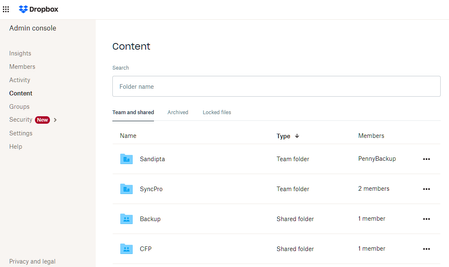
Hello Greg-DB I am trying to get list of Team and Shared Folders as shown in Content section of Admin console. I am able to get Team Folders using the Dot Net Official SDK: TeamFolderListResul...
- 4 years ago
To list all namespaces (including both team folders and shared folders) for the team via the .NET SDK, you can use NamespacesListAsync/NamespacesListContinueAsync.
And for reference, to just list the shared folders for a particular user, you can use ListFoldersAsync/ListFoldersContinueAsync.

gagsbh
4 years agoHelpful | Level 5
Thanks Greg-DB
I was able to obtain the list of Shared Folders using:
TeamNamespacesListResult result = await teamclient.Team.NamespacesListAsync();
List<NamespaceMetadata> lstMetatdata = result.Namespaces.ToList();
NamespaceMetadata has properties Name, NamespaceId, TeamMemberId
Is NamespaceId same as the FolderID of the Shared Folder ?
If not, how do I quickly obtain the FolderID of the Shared Folders obtained from the NamespacesListAsync API.
Thanks,
Gagan

Greg-DB Dropbox Community Moderator
4 years agoDropbox Community ModeratorYes, shared folders and team folders are both types of "namespaces". For a shared folder, the "namespace ID" is the same as the "shared folder ID" (and likewise, for team folders, the "namespace ID" is the same as the "team folder ID").
About Dropbox API Support & Feedback

Find help with the Dropbox API from other developers.
The Dropbox Community team is active from Monday to Friday. We try to respond to you as soon as we can, usually within 2 hours.
If you need more help you can view your support options (expected response time for an email or ticket is 24 hours), or contact us on X, Facebook or Instagram.
For more info on available support options for your Dropbox plan, see this article.
If you found the answer to your question in this Community thread, please 'like' the post to say thanks and to let us know it was useful!


