Your workflow is unique 👨💻 - tell us how you use Dropbox here.
Forum Discussion

JustUsAgency
8 years agoNew member | Level 2
How does Redirect URI in App Console work?
Hi there, I've been trying to get my head around OAuth redirect URI and it makes no sense to me! Can someone please explain to me how it works and how I make my plugin do the thing it should do? ...

Greg-DB Dropbox Community Moderator
8 years agoDropbox Community ModeratorI recommend reading through the OAuth guide first to get an understanding of how the flow works:
https://www.dropbox.com/developers/reference/oauth-guide
The documentation for it can be found here:
https://www.dropbox.com/developers/documentation/http/documentation#authorization
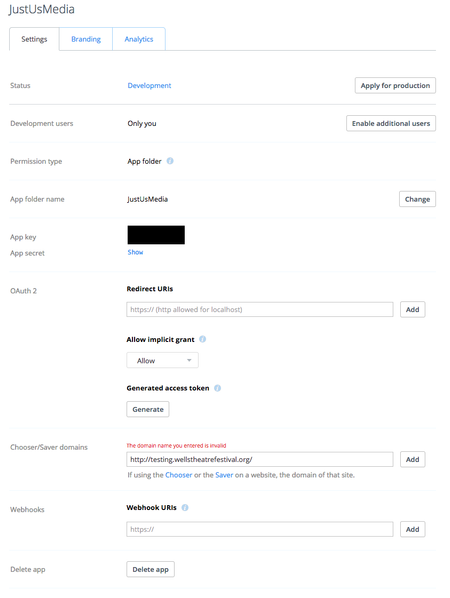
Also, in your screenshot, you're trying to register a redirect URI in the "Chooser/Saver domains" fields. That field is for a different feature. OAuth redirect URIs should be entered in the "OAuth 2 Redirect URIs" field above it.
 JustUsAgency8 years agoNew member | Level 2
Hi Greg, thanks for replying but the question already says I couldn't get my head around the documentation so telling me to read the documentation doesn't help that much.
I was asking whether or not I needed to fill in the OAuth section to utilise the Wordpress plugin that I'm using (https://en-gb.wordpress.org/plugins/external-media/). It needs the Chooser/Saver section but doesn't make any mention of the Oauth section. Is that an oversight on their part?
Charlie
- Greg-DB8 years agoApologies if that wasn't helpful! I wasn't sure if you read the OAuth guide in particular, so I wanted to make sure you were aware of it in addition to the normal documentation for the OAuth endpoints themselves.
I can't offer support or guidance on how the Wordpress plugin should be used, but if you do just need to use the Chooser/Saver, you don't need to set or use OAuth redirect URIs at all. (Your original message did ask for help with the latter, so apologies for the confusion there.)
Anyway, if you just need to set Chooser/Saver domains, note that when doing so you should input only the domain part (i.e., not including the protocol or path). So in your case, you should just enter "testing.wellstheatrefestival.org" (or "wellstheatrefestival.org" if you want to allow any subdomain). Hope this helps!
About Dropbox API Support and Feedback

Get help with the Dropbox API from fellow developers and experts.
The Dropbox Community team is active from Monday to Friday. We try to respond to you as soon as we can, usually within 2 hours.
If you need more help you can view your support options (expected response time for an email or ticket is 24 hours), or contact us on X, Facebook or Instagram.
For more info on available support options for your Dropbox plan, see this article.
If you found the answer to your question in this Community thread, please 'like' the post to say thanks and to let us know it was useful!


