Your workflow is unique 👨💻 - tell us how you use Dropbox here.
Forum Discussion

VyacheslavB
5 years agoHelpful | Level 5
How to display folders in the file list Dropbox API (Swift 5)
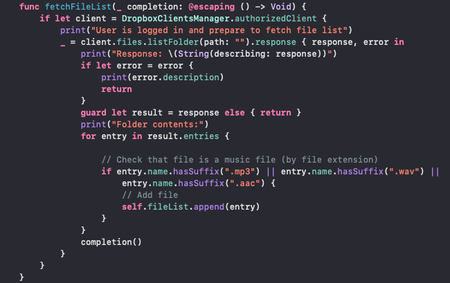
I get a list of the user's files and then filter it to show only the music files. But I also want to see subfolders. How should I set up my filter for this? Could you help me. My function where I ge...
- 5 years ago
To check if a particular entry is a file or a folder, you can check the type of the entry, such as by switching on it as shown in this example.

Greg-DB Dropbox Community Moderator
5 years agoDropbox Community ModeratorIf you want to access subfolders as well when listing a folder, you can set recursive:true when calling listFolder. That will make the results include nested entries as well.
Alternatively you can call separately to specifically list a particular subfolder, by passing in the path. To do so, get and pass in the relevant Metadata.pathLower.
Either way, make sure you also have listFolderContinue implemented (as documented under listFolder) to make sure you're getting all of the entries.
 VyacheslavB5 years agoHelpful | Level 5
If I want to use the second option (using the folder path), then how do I display only music files and folders? I use .hasSuffix for sorting, but then I cannot see the folder in the list.
How can I separate folders from files in code. A file has its extension, but how to filter so that folders are visible in the list too?As you understand, I want to have some attribute to know this is folder or file.
- Greg-DB5 years ago
To check if a particular entry is a file or a folder, you can check the type of the entry, such as by switching on it as shown in this example.
- VyacheslavB5 years agoHelpful | Level 5
When I try to use code from example, I get a warning: Cast from 'Files.ListFolderResult' to unrelated type 'Files.FileMetadata' always fails.
Maybe there is another option or a better example? Or am I doing something wrong?
About Dropbox API Support and Feedback

Get help with the Dropbox API from fellow developers and experts.
The Dropbox Community team is active from Monday to Friday. We try to respond to you as soon as we can, usually within 2 hours.
If you need more help you can view your support options (expected response time for an email or ticket is 24 hours), or contact us on X, Facebook or Instagram.
For more info on available support options for your Dropbox plan, see this article.
If you found the answer to your question in this Community thread, please 'like' the post to say thanks and to let us know it was useful!


