Your workflow is unique 👨💻 - tell us how you use Dropbox here.
Forum Discussion

VyacheslavB
5 years agoHelpful | Level 5
How to display folders in the file list Dropbox API (Swift 5)
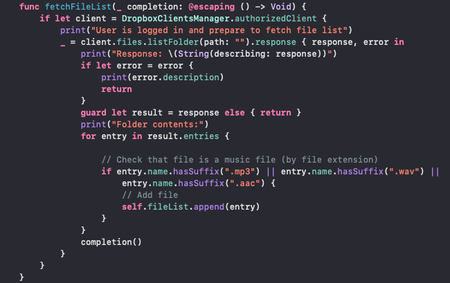
I get a list of the user's files and then filter it to show only the music files. But I also want to see subfolders. How should I set up my filter for this? Could you help me. My function where I ge...
- 5 years ago
To check if a particular entry is a file or a folder, you can check the type of the entry, such as by switching on it as shown in this example.

roggerCorrea
3 years agoExplorer | Level 3
Hi Viyalexhab,
How do you declare the variable fileList?
I'm trying t do the same thing, so I can append the files to it. But I can't figure out what type of variable you need to use to be able to append.
Thanks!

Greg-DB Dropbox Community Moderator
3 years agoDropbox Community ModeratorroggerCorrea It looks like fileList would be an array, perhaps initialized like 'var fileList = [Any]()', or maybe more ideally 'var fileList = [Files.Metadata]()'.
Your cast is failing because you're attempting to cast the entire array of Metadata, that is, your 'response', which is the listFolderResult?.entries, instead of individual Metadata entries.
You should instead first iterate over the entries to get each entry, like the 'for entry in result.entries {' line in the original post shows.
- roggerCorrea3 years agoExplorer | Level 3
Hi Greg, thank you so much. I'm new to Swift and still figuring out many things.
This was of great help!
About Dropbox API Support and Feedback

Get help with the Dropbox API from fellow developers and experts.
The Dropbox Community team is active from Monday to Friday. We try to respond to you as soon as we can, usually within 2 hours.
If you need more help you can view your support options (expected response time for an email or ticket is 24 hours), or contact us on X, Facebook or Instagram.
For more info on available support options for your Dropbox plan, see this article.
If you found the answer to your question in this Community thread, please 'like' the post to say thanks and to let us know it was useful!


