Your workflow is unique 👨💻 - tell us how you use Dropbox here.
Forum Discussion

ismdcf
7 years agoExplorer | Level 4
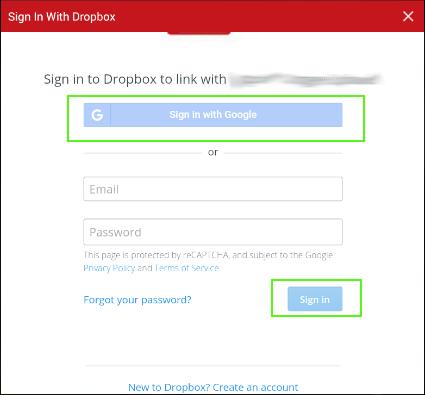
Oauth Sign In Buttons Disabled on All Versions of Android WebView
Edit 01/05/18
The sign in buttons are responsive again.
-----------------------------------------------------
I know that it is not recommended to use Oauth from a webview. But I have no option...
- 7 years ago
ismdcf Thanks for the information. I'll pass it along to the team. While we'll try to maintain compatibility when possible, unfortunately we can't officially promise support in the future. If you are able to update the browser engine used by the web view over time, I recommend doing so.

Greg-DB Dropbox Community Moderator
7 years agoDropbox Community Moderatorismdcf Thanks for following up. I'm glad to hear this is working again for you.
For reference though, per the official documentation, you should process this in the system browser, and not a web view. In addition to supporting the Google Sign In flow per Google's requirements in the future, that will offer the best compatibility with the Dropbox site in general.
scarless I see you also posted your own thread for this, so I'll follow up there:

ismdcf
7 years agoExplorer | Level 4
Thanks Greg-DB for the reply :)
Like I have mentioned in the post, the android device our application runs on does not have a system browser or google chrome. Thus webview is the only option I have. Once we get the token we encrypt it and store it on the shared pref so that the does'nt need to sign in again.
- Greg-DB7 years ago
ismdcf Thanks for the information. I'll pass it along to the team. While we'll try to maintain compatibility when possible, unfortunately we can't officially promise support in the future. If you are able to update the browser engine used by the web view over time, I recommend doing so.
About Dropbox API Support and Feedback

Get help with the Dropbox API from fellow developers and experts.
The Dropbox Community team is active from Monday to Friday. We try to respond to you as soon as we can, usually within 2 hours.
If you need more help you can view your support options (expected response time for an email or ticket is 24 hours), or contact us on X, Facebook or Instagram.
For more info on available support options for your Dropbox plan, see this article.
If you found the answer to your question in this Community thread, please 'like' the post to say thanks and to let us know it was useful!


