Your workflow is unique 👨💻 - tell us how you use Dropbox here.
Forum Discussion

Samnis
5 years agoExplorer | Level 4
Objective-C SDK crash
Hi,
in my project I am using the Objective-C SDK: I am updating the app to use scopes and short lived tokens. I added the SDK to the project by manually copying all the classes.
I am getting ...

Samnis
5 years agoExplorer | Level 4
Hi Greg,
thank you for your answer. Yes, I installed the latest release (version v5.0.4). I installed it manually by following the steps of the pod file, so it shouldn't be an installation problem. Infact, as said with the previous message, the crash only occurs just after my app is called back after the authorization flow. If I run again the app there are no crashes and the app is correctly linked to Dropbox.
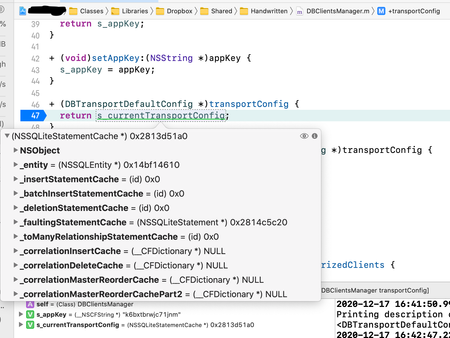
The exact line that triggers the crash is the line 43 of the class DBTransportBaseClient : this is the first line in which the parameter "transportConfig" is used, and the crash occurs because at runtime the parameter is of a different class, not the "DBTransportBaseConfig" one, and so it crashes because the instance doesn't have an "appKey" method.
Hope this helps.
Mario

Greg-DB Dropbox Community Moderator
5 years agoDropbox Community ModeratorThanks for following up. First, when you say you "installed it manually by following the steps of the pod file", do you mean you followed the "CocoaPods" installation method instructions in particular?
Also, I understand you saw the issue occur in DBTransportBaseClient, but it would be helpful to know what code you were running yourself, and on which line of that the issue occurred. For instance, you said it "occurs just after my app is called back after the authorization flow", so it sounds like it's occurring during the "Handle redirect back into SDK" step. Is that correct? For example, is it occurring when your app calls "handleRedirectURL", or something else? Please share the relevant code you're running (not in the Dropbox SDK itself) for reference.
These additional details for how to replicate your scenario would be useful, since this issue doesn't reproduce for me. I've installed the official Dropbox Objective-C SDK v5.0.4 using CocoaPods into a project, set up the authorization flow as documented, and run the project using Xcode 12.3 on a device running iOS 14.2, and it doesn't crash for me.
- Samnis5 years agoExplorer | Level 4
Yes, I installed it by manually following the steps of the pod file of the "CocoaPods" installation method.
Yes, the crash occurs during the "handle redirect back into SDK". The code I use for managing the redirect is the following (it is a method of the app delegate):
- (BOOL)application:(UIApplication *)app openURL:(NSURL *)url options:(NSDictionary<UIApplicationOpenURLOptionsKey, id> *)options {
    DBOAuthCompletion completion = ^(DBOAuthResult *authResult) {
        if (authResult != nil) {
            if ([authResult isSuccess]) {
                // update the flag
                self.automaticallyUpdateDropboxInfo = YES;
            }
            else if ([authResult isCancel]) {
                // log
                // ...
            }
            else if ([authResult isError]) {
                // log
                // ...
            }
        }
    };
    BOOL canHandle = [DBClientsManager handleRedirectURL:url completion:completion];
    return canHandle;
}
I also add the code I use to begin the authorization flow. I don't think it is the problem, but who knows... The code is the following:
- (void)linkUser {
    DBScopeRequest *scopeRequest = [[DBScopeRequest alloc] initWithScopeType:DBScopeTypeUser
                                                                      scopes:@[@"account_info.read",
                                                                               @"files.metadata.read",
                                                                               @"files.metadata.write",
                                                                               @"files.content.read",
                                                                               @"files.content.write"]
                                                        includeGrantedScopes:NO];
    [DBClientsManager authorizeFromControllerV2:[UIApplication sharedApplication]
                                     controller:[self getRootViewController]
                          loadingStatusDelegate:nil
                                        openURL:^(NSURL *url) {
                                                      [[UIApplication sharedApplication] openURL:url
                                                            options:[NSDictionary dictionary] completionHandler:nil];
                                                }
                                   scopeRequest:scopeRequest];
}
Please help, I am stuck on this since a week... Thank you very much,
Mario
- Samnis5 years agoExplorer | Level 4
PS: I have installed the Dropbox app into my device, and I am logged into it. So the official Dropbox app takes part to the authentication flow.
Hope this helps,
Mario
- Greg-DB5 years ago
Thanks! This all looks correct. I also just tried copying these snippets into my own sample project here though to be sure, but I still can't reproduce the issue. (And I also have the official Dropbox iOS app installed, handling the app authorization flow.)
Also, just to confirm, you're calling DBClientsManager setupWithAppKey in didFinishLaunchingWithOptions, right?
It's unclear why this would be occurring, as these unexpected classes (NSSQLiteStatementCache, NSContentSizeLayoutConstraint, and UICTFontDescriptor) seem to be from system frameworks (such as Core Data and Foundation). The Dropbox Objective-C SDK doesn't reference these classes at all.
A few more things to try to narrow this down:
- Is this reliably reproducible for you, or does it only happen on random attempts?
- Have you tried this on multiple devices? Have you tried it in the simulator?
- Have you tried completely uninstalling and reinstalling the Dropbox SDK?
- Do you have any non-standard project settings? Does this also occur for you if you set it up in a new project?
About Dropbox API Support and Feedback

Get help with the Dropbox API from fellow developers and experts.
The Dropbox Community team is active from Monday to Friday. We try to respond to you as soon as we can, usually within 2 hours.
If you need more help you can view your support options (expected response time for an email or ticket is 24 hours), or contact us on X, Facebook or Instagram.
For more info on available support options for your Dropbox plan, see this article.
If you found the answer to your question in this Community thread, please 'like' the post to say thanks and to let us know it was useful!


