Your workflow is unique 👨💻 - tell us how you use Dropbox here.
Forum Discussion

Samnis
5 years agoExplorer | Level 4
Objective-C SDK crash
Hi,
in my project I am using the Objective-C SDK: I am updating the app to use scopes and short lived tokens. I added the SDK to the project by manually copying all the classes.
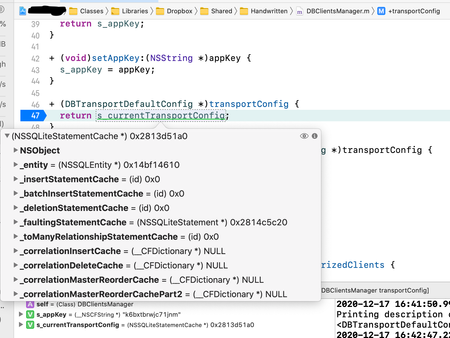
I am getting ...

Greg-DB Dropbox Community Moderator
5 years agoDropbox Community ModeratorThanks! This all looks correct. I also just tried copying these snippets into my own sample project here though to be sure, but I still can't reproduce the issue. (And I also have the official Dropbox iOS app installed, handling the app authorization flow.)
Also, just to confirm, you're calling DBClientsManager setupWithAppKey in didFinishLaunchingWithOptions, right?
It's unclear why this would be occurring, as these unexpected classes (NSSQLiteStatementCache, NSContentSizeLayoutConstraint, and UICTFontDescriptor) seem to be from system frameworks (such as Core Data and Foundation). The Dropbox Objective-C SDK doesn't reference these classes at all.
A few more things to try to narrow this down:
- Is this reliably reproducible for you, or does it only happen on random attempts?
- Have you tried this on multiple devices? Have you tried it in the simulator?
- Have you tried completely uninstalling and reinstalling the Dropbox SDK?
- Do you have any non-standard project settings? Does this also occur for you if you set it up in a new project?

Samnis
5 years agoExplorer | Level 4
Hi Greg, some updates:
- Now it works: to fix the problem I completely uninstalled the Dropbox SDK and reinstalled it with Cocoapods. Nothing else worked.
- I am calling DBClientsManager.setupWithAppKey in app delegate "applicationDidBecomeActive:", but this shouldn't be a problem.
- The crash was 100% reproducible. I tried it on multiple devices, iPhones and iPads, and it crashed every time.
Thank you very much for your help :-)
Mario
- Samnis5 years agoExplorer | Level 4
Another question: if I update the configuration of my production app to use scopes and short-lived tokens, what happens to users who never update the app? Will they be able to connect the app to Dropbox in following weeks, or they will get an error? And what will happen after September 30, 2021?
Thank you,
Mario
- Greg-DB5 years ago
Any users using old versions of your app will continue to be able to use it without issue for now. Once you switch the "Access token expiration" setting for your app on the App Console to "Short-lived", or on September 30, 2021, whichever comes first, users using old versions of your app should still be able to use it, but they'll start receiving short-lived access tokens when they process the app authorization flow, instead of long-lived access tokens. Short-lived access tokens only last for four hours, at which point further API calls will fail, and the app will receive an DBAUTHAuthError (like it would currently if the user unlinks the app from their account). Exactly how your app handles that error depends on how you've programmed it. E.g., it may prompt the user to re-authorize the app.
- Samnis5 years agoExplorer | Level 4
Hi Greg,
please tell me if I am wrong.
I have updated the code of the app to use short-lived tokens, and I will release the update on the App Store in a few days.
But I haven't updated the app on the console of my Dropbox account. If so, users who update the app can connect it to Dropbox, or I need to updated the app on the console and set the "Access token expiration" to "Short-lived"? To recap, I would release the updated app on the App Store with the code using short-lived tokens, but without setting the "Access token expiration" to "Short-lived" on the console. There is something wrong about it? Or I need to set the "Access token expiration" to "Short-lived" before releasing the app update on the App Store? Is this mandatory?
Thank you very much,
Mario
- Greg-DB5 years ago
You are not required to change the "Access token expiration" setting for your app. If you do not change it, existing users on old versions of your app will continue using the old flow, and users on the updated version of the app will use the new flow. If you do not change it, nothing will change for old versions of your app until September 30th, 2021.
- Samnis5 years agoExplorer | Level 4
Ok, thank you very much Greg.
I'll leave the setting as is, and I only publish the new version of the app. This seems the best approach to me.
Thank you again,
Mario
About Dropbox API Support and Feedback

Get help with the Dropbox API from fellow developers and experts.
The Dropbox Community team is active from Monday to Friday. We try to respond to you as soon as we can, usually within 2 hours.
If you need more help you can view your support options (expected response time for an email or ticket is 24 hours), or contact us on X, Facebook or Instagram.
For more info on available support options for your Dropbox plan, see this article.
If you found the answer to your question in this Community thread, please 'like' the post to say thanks and to let us know it was useful!


