Your workflow is unique 👨💻 - tell us how you use Dropbox here.
Forum Discussion

Omri1984
1 year agoExplorer | Level 4
Old dropbox and new dropbox API
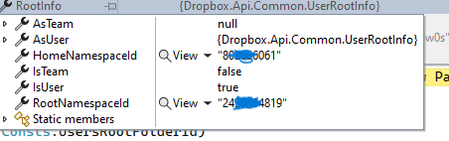
Hi , i know that dropbox made a lot of changes in the last few years. i want to understand something there where a time that i needed to check the account , and check if the account is team in o...
- 1 year ago
Omri1984 The combination of the two features allows an app to distinguish between all three team configurations. Please refer to this post for information on that. The recommendation is use these feature values to programmatically determine how to handle any particular team, as described throughout that post.

Omri1984
1 year agoExplorer | Level 4
Thank you Здравко and thank you Greg-DB i will give it a try.
In the past i implement changes that decided if it a new team or old by the root info.isteam
So now i have 3 options? New team old team and no team. And according to table i saw in article this is the way i need to decide if to use the team space client or the old client ??

Greg-DB Dropbox Community Moderator
1 year agoDropbox Community ModeratorOmri1984 Yes, there are currently three possible team configurations. The linked resources cover how to detect all of the different feature states so apps can use the features accordingly. Note though that the 'Dropbox-API-Path-Root' header is supported by all three configurations, so you can use that to set the root when calling for any account regardless of the team configuration if you wish to do so. That can make your code a bit simpler.
- Omri19841 year agoExplorer | Level 4
ok i am working on requesting the get values from the api,
just one more thing how do i know when to call the team.getvalues or user.getvalues
for old and new team should i use the team and for personal user i need to use the user ?
- Omri19841 year agoExplorer | Level 4
also trying to fetch the get values and getting an error such as
creating client with https://api.dropboxapi.com and a Bearer token
var requestBody = "{\"features\":[{\".tag\":\"\"distinct_member_home\"},{\".tag\":\"team_shared_dropbox\"}]}";
var content = new StringContent(JsonConvert.SerializeObject(requestBody), Encoding.UTF8, "application/json");
content.Headers.ContentType = new MediaTypeHeaderValue("application/json");var res = await httpClient.PostAsync("/2/users/features/get_values",content);
but always get the same response of:
Result: "Error in call to API function \"users/features/get_values\": request body: expected object, got string"
am i missing something here
- Здравко1 year agoLegendary | Level 20
Hi Omri1984,
Why are you doing your life difficult and trying to rediscover hot water? 😯😀 That, what you're trying to figure out is already done in the official Dropbox .NET SDK and you can use it ready for use! 🤷 Why you don't you make your life easier? 😉
Omri1984 wrote:...
var requestBody = "{\"features\":[{\".tag\":\"\"distinct_member_home\"},{\".tag\":\"team_shared_dropbox\"}]}";
var content = new StringContent(JsonConvert.SerializeObject(requestBody), Encoding.UTF8, "application/json");
...
Result: "Error in call to API function \"users/features/get_values\": request body: expected object, got string"
am i missing something here
🙂 Maybe "missing" is not the exact word. Do you understand what JSON object means? What do you have in your requestBody variable? 🤔 Is that an object or some string what you later serialize? 🧐
Actually you have done something twice, not missing! 😉 That what the error message signals for.
By the way you are setting you content type twice. The second one:
Omri1984 wrote:...
content.Headers.ContentType = new MediaTypeHeaderValue("application/json");...
... may be skipped since already exists in previous code statement.
Hope this drive you in right direction.
- Greg-DB1 year ago
Omri1984 The team features tell you information about the entire team itself, and the user features tell you information about the specific user account (which may be a member of a team, and so there would be some overlap with the team features). Exactly which you use is up to you, depending on what you need to know in your app.
In any case, like Здравко mentioned, I do not recommend trying to re-implement these calls outside of the .NET SDK. If you're using the .NET SDK, I recommend continuing to use it as-is. While it does not have the new feature values implemented natively, you can use the root information returned by GetCurrentAccountAsync (like shown in your original screenshot) to determine the same things. Please refer to my earlier message for an explanation of the conditions to check.
- Omri19841 year agoExplorer | Level 4
Hi Greg-DB
From the get current account i used to use in the past. It return is team = true when it was a new space team
But now it is changed.
Can please explain again how can i know if it is a bew team old team or user . And if it is a user if i can tell if it auser inside a old team new team or jist user with no team .
Please clear that for me 😁

About Dropbox API Support and Feedback

Get help with the Dropbox API from fellow developers and experts.
The Dropbox Community team is active from Monday to Friday. We try to respond to you as soon as we can, usually within 2 hours.
If you need more help you can view your support options (expected response time for an email or ticket is 24 hours), or contact us on X, Facebook or Instagram.
For more info on available support options for your Dropbox plan, see this article.
If you found the answer to your question in this Community thread, please 'like' the post to say thanks and to let us know it was useful!


